
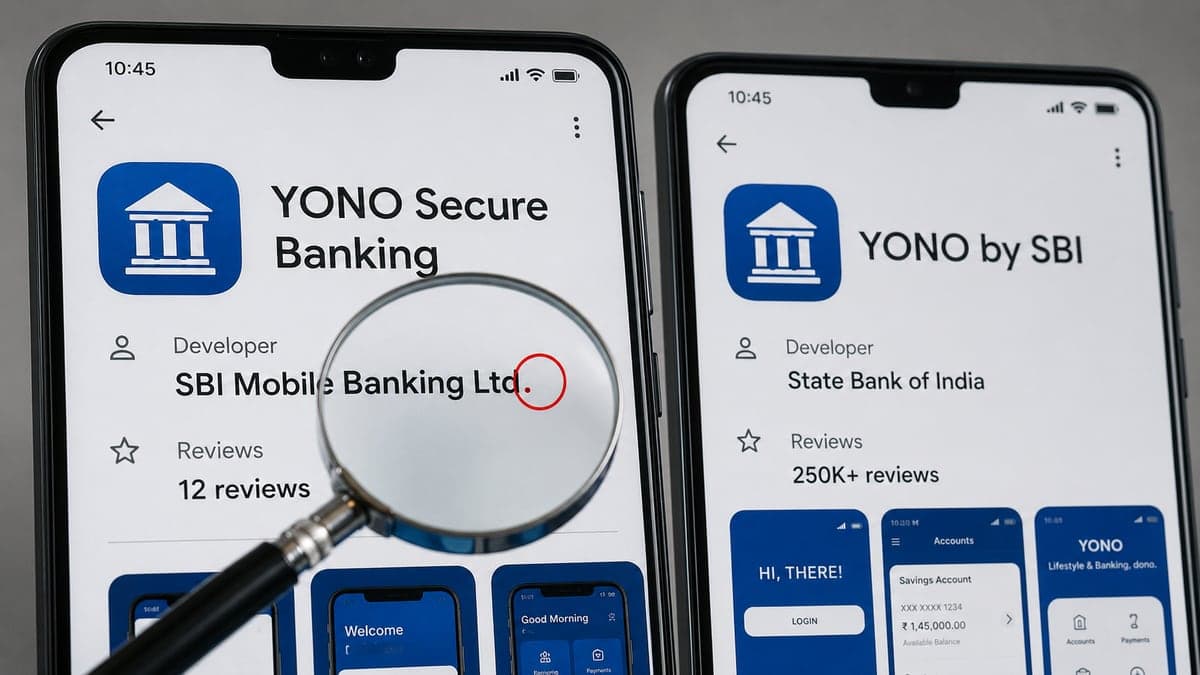
Two phones sit side by side. Both show a blue bank icon, both say YONO, both look like the app your branch manager told you to download. On one, the developer is State Bank of India and there are 250,000 plus reviews. On the other, the developer is SBI Mobile Banking Ltd. and there are 12 reviews. That single period, and that review count, is the entire difference between banking safely and handing a stranger your OTPs. Mobile app safety India 2026 comes down to noticing details that take sixty seconds to check and cost lakhs to miss.
India has over 600 million smartphone users, and for most of them the phone is the bank, the ration card, the medical record, and the wallet all at once. That concentration is exactly why fake apps are now one of the most productive fraud channels in the country. In July 2026, Surat police arrested an 18 year old Class 11 dropout who had built 121 fake Android apps impersonating banking, payment, and government services, rented them out to cybercrime syndicates for Rs 10,000 to Rs 15,000 a month, and enabled roughly Rs 64.38 crore of fraud across more than 21,672 infected phones.
This guide covers the five dangerous app categories currently active against Indian users, the exact 7 point check to run before every install, the permissions no normal app should ever ask for, and a five minute audit of the apps already sitting on your phone.
If you just installed an app you are now unsure about
- 1Turn on airplane mode immediately so the app cannot send data or read a fresh OTP
- 2Uninstall it: Settings, Apps, select the app, Uninstall
- 3If Uninstall is greyed out, go to Settings, Security, Device Administrators and uncheck it first
- 4Change your banking, email, and UPI passwords from a different device, not this phone
- 5Check your bank statement and your UPI autopay mandates for anything you did not authorise
- 6If any money moved, call 1930 and file at cybercrime.gov.in the same day
Why App Safety Matters More Than Ever in India
The scale of app based fraud in India is no longer anecdotal. Financial fraud complaints on the National Cybercrime Reporting Portal rose from 2.62 lakh in 2021 to 24.02 lakh in 2025, and by 30 June 2026 the Citizen Financial Cyber Fraud Reporting and Management System had saved more than Rs 11,158 crore across 32.80 lakh complaints. In 2025 alone, 1,03,488 senior citizens and 4,63,114 women reported cyber fraud losses totalling Rs 7,769.63 crore. A large share of those cases begin with something installed on a phone.
Google is not passive here. Its 2025 Android and Play safety report says it blocked more than 1.75 million policy violating apps from reaching the Play Store, banned over 80,000 bad developer accounts, and denied more than 255,000 apps access to sensitive user data. Google Play Protect now runs over 350 billion app scans a day. India was singled out for special treatment as far back as October 2024, when Google launched an enhanced fraud protection pilot that automatically blocks the sideloading of apps requesting the permission combination most abused for financial fraud: reading SMS, listening to notifications, and accessibility services.
And yet fake apps still get through. In May 2026, ESET researcher Lukáš Štefanko exposed a fraud campaign named CallPhantom: 28 Android apps on Google Play that promised to reveal call history, SMS records, and WhatsApp logs for any phone number. They had accumulated more than 7.3 million downloads, one app alone crossing 3 million, and charged subscriptions between roughly six and eighty dollars. In return, users got randomly generated fake data. The campaign primarily targeted Android users in India and the Asia Pacific region, and at least one app impersonated an Indian gov.in service to look credible.
The lesson is not that the Play Store is worthless. It is that store screening is a filter, not a guarantee, and the last check has to be yours.
The 5 Types of Dangerous Apps Targeting Indian Users
These five categories account for the overwhelming majority of app based fraud reported in India right now.
Type 1: Fake Banking and Payment Apps
These are near perfect visual clones of apps like SBI YONO, BHIM, or a private bank app, published under a developer name that is a slight variation of the real one. Deccan Herald has reported clones of SBI YONO, IRCTC Rail Connect, Income Tax Faceless, EPFO Passbook, BHIM, and mAadhaar being uploaded under near identical names, alongside malware laced fake banking apps circulated directly on WhatsApp and Telegram as APK download links.
The Surat case shows how industrialised this has become. Rohit Virendra Singh Shakya, an 18 year old from Uttar Pradesh who taught himself to code from YouTube and AI tools, built 121 malicious APKs including one named PNB One.apk, then sold access on a subscription model to syndicates operating out of Jamtara, Haryana, and Rajasthan. Police linked the toolkit to more than 54,000 fraudulent transactions worth about Rs 64.38 crore across 21,672 phones. Once installed, the apps gave the operators remote access to OTPs, banking passwords, and personal data.
The defence is boring and effective: open the app only from a link on your bank official website or by searching the store and confirming the developer is the bank legal entity name, exactly. If you already suspect an account has been touched, our bank account fraud guide walks through the containment steps.
Type 2: Fake Loan Apps, the Data Theft Trap
Instant loan apps are the single most abused app category in India. ESET tracks this family under the detection name SpyLoan, spyware wearing a loan app costume. It found 18 such apps on Google Play with 12 million combined downloads, after already reporting more than 20 apps with 9 million downloads two years earlier, and detections surged 90 percent between the second half of 2022 and the first half of 2023. India sits among the countries with the highest prevalence. McAfee separately recorded a further 75 percent rise in SpyLoan apps and infected devices between the second and third quarters of 2024.
The business model is not really lending. The app asks for contacts, photos, SMS, and location as a condition of the loan, sanctions a small amount at a punishing interest rate, and then uses the harvested contact list and gallery to threaten and shame the borrower into paying. Victims have described morphed photos being sent to their own family and colleagues. The data theft is the product, and the loan is the bait. Our fake loan app guide for 2026 covers the recovery and reporting route in detail.
A genuine lender in India is either a bank or an NBFC registered with the Reserve Bank of India, names the registered lender inside the app, and does not need your gallery to approve a loan.
Type 3: Fake Government Service Apps
Government schemes are ideal bait because the promise is credible and the audience is large. Rajasthan Police cyber crime branch and Nagaland Police have both issued public advisories about a file circulating as PM KISAN.apk, which claims the user can register for the PM Kisan Samman Nidhi scheme or instantly receive Rs 6,000. Installing it silently deploys backdoor malware that hands attackers OTPs, login credentials, and financial data.
The same pattern is recycled with different labels: KYC update apps, electricity bill payment apps, gas booking apps, traffic fine apps. In January 2026, the Press Information Bureau publicly refuted a viral message sent in the name of SBI that instructed users to install an APK to update their Aadhaar, and advised people never to download APKs or share personal, banking, or Aadhaar details on that basis. If you have received one of these, the KYC update scam guide shows exactly how the message is constructed.
No Indian government department distributes an app through WhatsApp. Every genuine one is on the Play Store or App Store under a department or ministry developer account, and is linked from a gov.in website.
Type 4: Spyware Disguised as Useful Utilities
This is the quietest category, because nothing appears to go wrong. ESET documented VajraSpy, a remote access trojan delivered through twelve trojanised Android apps that posed as ordinary messaging and news apps with names like Privee Talk, MeetMe, Let's Chat, Rafaqat, and Wave Chat. Most victims were located in India and Pakistan, and the apps were typically pushed to targets through a romance style honeytrap chat. Once installed, VajraSpy could steal contacts, files, call logs, device location, SMS messages, and WhatsApp and Signal messages, record phone calls, and take photos with the device camera.
SpyNote follows the same logic through a different door, distributed from newly registered websites built to look like Google Play install pages for apps such as Chrome, and abusing accessibility services to harvest whatever is on screen.
A torch app, a photo editor, a caller ID app, or a chat app that a stranger insisted you install are all worth a second look. The CallPhantom apps that took 7.3 million downloads sat in exactly this category, promising a call history lookup that no legitimate app can legally provide in India.
Type 5: APK Files Sent via WhatsApp or a Link
If there is one rule in this guide to memorise, it is this one. An APK sent over WhatsApp, SMS, Telegram, or email bypasses every safety check the app stores perform, which is precisely why fraudsters prefer it.
The wedding invitation APK is the best known Indian example. A file that looks like a digital shaadi card, sometimes wrapped in a PDF or a zip, arrives from a number that may even belong to someone you know. On install it quietly requests SMS, contacts, accessibility, and notification permissions, then reads incoming OTPs, harvests the contact list to forward itself onward, and in many reported cases sets up unauthorised UPI mandates or net banking transfers. Police cyber cells in Maharashtra, Karnataka, Himachal Pradesh, and Delhi have flagged it repeatedly since late 2024, with fresh cases every wedding season and reported losses of up to about Rs 1.9 lakh per victim.
The same technique carries fake courier tracking apps, fake electricity bill apps, and fake bank update apps. Related message formats are broken down in our WhatsApp scam guide. Whatever the label, the answer is identical: do not install an APK, ever, and delete the message.
How to Check If Any App Is Safe Before Installing
Run this before every install. It takes under two minutes and catches all five categories above.
How to check if an app is safe to install in India:
- 1Only install from the official Google Play Store or Apple App Store, never from links
- 2Check the developer name, it should match the company exactly, not a variation
- 3Check the number of downloads and the review count, legitimate apps have thousands
- 4Read the most recent 1 star reviews, they reveal current user problems
- 5Check what permissions the app requests, contacts, SMS and call logs are red flags for non banking apps
- 6Search "[app name] scam India" or "[app name] fake" on Google before installing
- 7For banking or government apps, verify the developer on the bank or department official website
Never install any APK file sent via WhatsApp, SMS, or email.
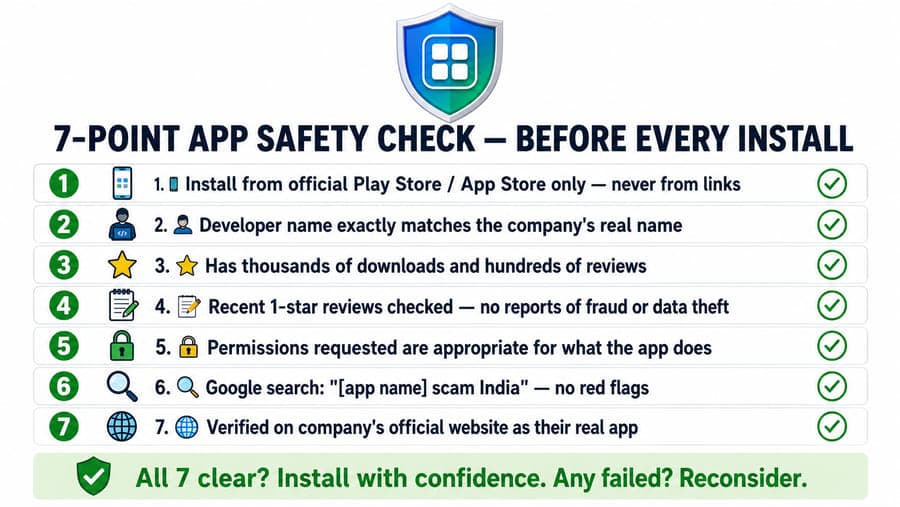
Two of these steps do most of the work. The developer name catches every clone, because a fraudster cannot register the bank real legal entity name on the store. The recent 1 star reviews catch every app that has turned malicious after launch, because the first victims almost always post about it before the app is pulled. If an app download link arrived by message rather than from the store, run it through the RakshaAI website safety checker first.
Dangerous Permissions, What Any App Should Never Ask For
Permissions are where a fake app stops pretending. The combination below is what Google itself targeted when it began blocking risky sideloaded installs in India, and it is the technical signature of nearly every financial fraud app operating in the country.
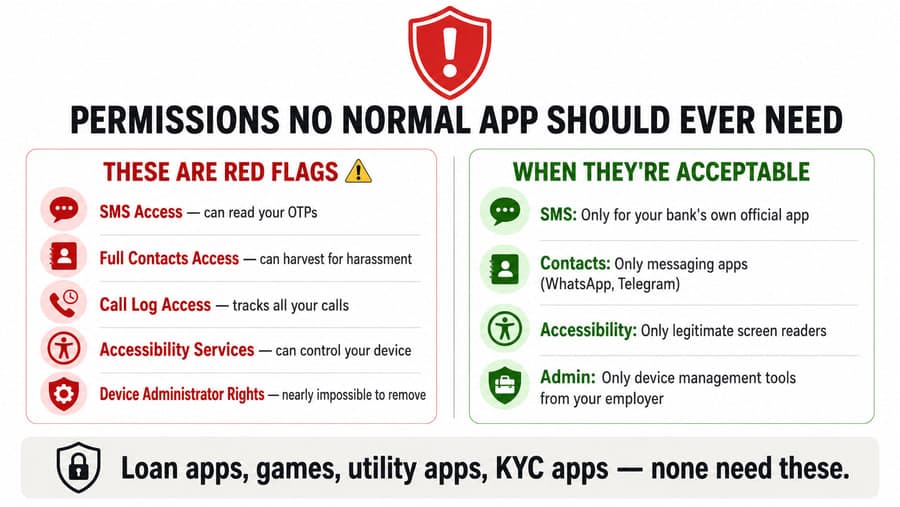
- SMS access. This is the one that empties accounts. An app with SMS permission reads every OTP the moment it arrives, silently, without the screen ever lighting up. Acceptable only for your own bank official app, and even then it is optional.
- Full contacts access. Harvested contact lists are the raw material for loan app blackmail, and for forwarding malware onward to people who trust you. Acceptable for genuine messaging apps such as WhatsApp or Telegram, and nothing else.
- Call log access. This tracks who you speak to and when, which is used to build a social pressure map. Almost no consumer app has a legitimate reason for it.
- Accessibility services. The most dangerous of all. It lets an app read everything on your screen and tap buttons on your behalf, which means it can complete a transaction while you watch. Acceptable only for genuine screen readers and assistive tools.
- Device administrator rights. Scam apps request this so they cannot be uninstalled normally. Acceptable only for device management software issued by your employer.
Loan apps, games, utility apps, and KYC apps need none of these. If a torch app wants your contacts or a loan app wants your gallery, the app is the fraud. Deny the permission, then uninstall.
How to Audit the Apps on Your Phone Right Now
Most people never look at what they granted years ago. This audit takes five minutes and is worth doing today, and every few months after that.
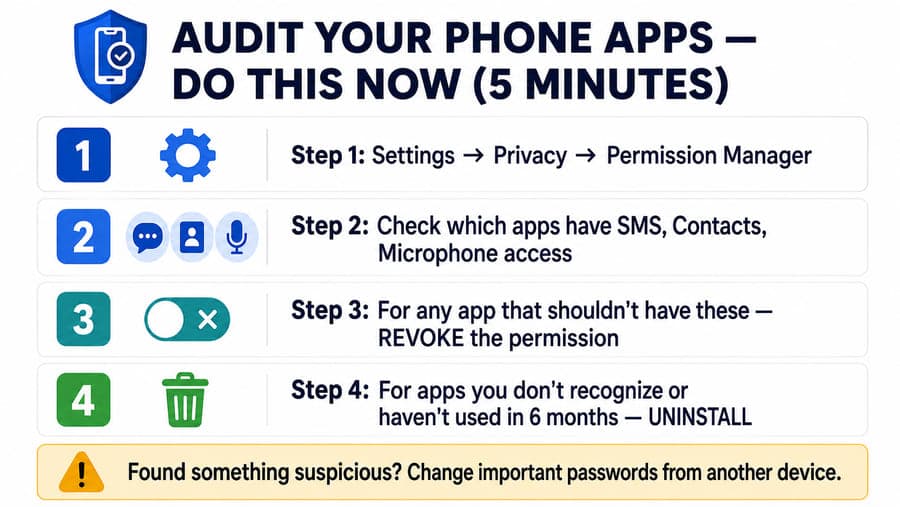
- Open Settings, then Privacy, then Permission Manager on Android. On iPhone, open Settings, then Privacy and Security.
- Check which apps hold SMS, Contacts, Microphone, Camera, and Location access, and read the list slowly.
- For any app that has no business holding a permission, revoke it. Nothing breaks that matters, and the app will ask again if it genuinely needs it.
- Open Settings, Security, Device Administrators and uncheck anything you did not deliberately install.
- Uninstall any app you do not recognise, or have not opened in six months. Unused apps are pure risk.
- Finally, check Google Play Protect is on: Play Store, tap your profile picture, Play Protect, Settings, and confirm scanning is enabled.
If the audit turns up something you did not install, treat it as a live incident. Change important passwords from a different device, review your bank statement and UPI autopay mandates, and keep the broader habits in our cyber hygiene checklist running afterwards.
30 Second Instagram Reel Script
Format: hook on the two phone screens, then quick cuts through the permission card, the 7 point check, and the audit steps.
On-screen caption: Never install an APK sent on WhatsApp. Check the developer name before every install.
Frequently Asked Questions
Is every app on the Google Play Store safe in India?
No. Google has real safeguards, and its own 2025 safety report says it blocked more than 1.75 million policy violating apps and banned over 80,000 bad developer accounts in a single year. But fake and malicious apps sometimes pass initial screening before being reported and removed. In May 2026, ESET researchers exposed 28 fraudulent apps that had already collected more than 7.3 million downloads on Google Play, mostly from users in India and the Asia Pacific region, and one of them impersonated an Indian gov.in service. Always verify the developer name, review count, and download count, and check the app on the company official website before installing.
Is it safe to install APK files in India?
No. APK files installed from outside the Play Store bypass Google safety checks and can contain malware, spyware, or fake versions of legitimate apps. Surat police arrested an 18 year old in July 2026 who had built 121 fake APKs impersonating banking, payment, and government apps, and those APKs were linked to roughly Rs 64.38 crore of fraud across more than 21,000 infected phones. The most dangerous APKs in India are update APKs for WhatsApp or banking apps, PM KISAN registration APKs, KYC apps, electricity bill apps, and wedding invitation cards sent over WhatsApp. Never install them.
What phone permissions are dangerous for any app in India?
No app needs these unless it is specifically justified: SMS access, which lets it read your OTPs, full contacts access, which can be harvested for blackmail, call log access, accessibility services, which can control your device screen, and device administrator rights, which make an app nearly impossible to remove. Loan apps, utility apps, games, and KYC apps should never need any of these. Google flagged this exact permission group when it launched its enhanced fraud protection pilot in India, blocking sideloaded apps that request SMS reading, notification listening, and accessibility access. If an app requests them, deny and reconsider installing it.
How do I remove a dangerous app from my phone in India?
Go to Settings, then Apps, find the app, and tap Uninstall. If it has device administrator rights, which scam apps often request, first go to Settings, then Security, then Device Administrators, and uncheck it, then uninstall. After removing a suspicious app, change all important passwords from a different device, check your bank statements and UPI mandates, and file a report at cybercrime.gov.in if any money moved.
How do I audit which apps have dangerous permissions on my phone?
Go to Settings, then Privacy, then Permission Manager. Review which apps have access to Contacts, SMS, Microphone, Camera, and Location. For any app that should not need these, revoke the permission or uninstall the app entirely. Do this every few months, and always after anyone else has handled your phone.
How do I report a fake app in India?
Report the listing inside the Play Store using the Flag as inappropriate option on the app page, report the number or message that sent you the app on the Chakshu facility at sancharsaathi.gov.in, and file a complaint at cybercrime.gov.in or call 1930 if money was lost. If the app impersonates a bank or a government department, also inform that organisation directly through the contact details on its official website.
Sources and Credits
- Business Today, Rs 64 Crore Cyber Scam Unravels After Teen Behind AI Driven Fake Banking Apps Arrested by Surat Police: the July 2026 Surat arrest of an 18 year old who built 121 fake banking, payment and government APKs, rented at Rs 10,000 to Rs 15,000 a month, linked to Rs 64.38 crore across 21,672 phones and over 54,000 fraudulent transactions.
- Deccan Herald, Fraudsters Using WhatsApp to Spread Malware Laced Fake Banking Apps: clones of SBI YONO, IRCTC Rail Connect, Income Tax Faceless, EPFO Passbook, BHIM and mAadhaar published under near identical names, and APK links pushed through messaging apps.
- The Hacker News, Fake Call History Apps Stole Payments From Users After 7.3 Million Play Store Downloads: ESET researcher Lukáš Štefanko on the CallPhantom campaign, 28 fraudulent apps with over 7.3 million downloads targeting India and Asia Pacific, one impersonating an Indian gov.in service.
- ESET Research, Fake Call Logs, Real Payments, How CallPhantom Tricks Android Users: the primary ESET research writeup of the CallPhantom apps, the fabricated call and message data they returned, and the subscription charges levied on victims.
- ESET Research, Beware of Predatory Fintech, Loan Sharks Use Android Apps to Reach New Depths: the SpyLoan family of predatory loan apps, over 12 million Google Play downloads, with India among the most affected countries and harvested contacts and photos used for extortion.
- The420.in, Exposed, Fake Loan Apps Swindle Over 12 Million Users on Google Play: the Indian reporting on the same SpyLoan app set and the blackmail mechanics used against borrowers.
- ThePrint, Rajasthan Police Warns Against Fake PM-KISAN Apps and Links: the Rajasthan cyber crime branch advisory on the PM KISAN.apk file promising instant Rs 6,000 registration while installing backdoor malware.
- Nagaland Police Cybersecurity Alert on the Fake PM Kisan Yojana APK: a second state police advisory on the same APK targeting scheme beneficiaries.
- News on AIR, Government Refutes Fake SBI Message Claiming Aadhaar Update via APK: the January 2026 PIB fact check warning against installing APKs or sharing Aadhaar and banking details based on such messages.
- Deccan Herald, New Scam Alert, This Wedding Invitation Takes Over Your Phone, Steals Data and Money: the wedding invitation APK scam, the SMS, contacts, accessibility and notification permissions it requests, and the OTP theft and unauthorised UPI mandates that follow.
- The Tribune, Beware, Scammers Using Digital Wedding Invites to Dupe People: Himachal Pradesh police warning on the same APK format during festive and wedding season.
- ESET Research, VajraSpy, A Patchwork of Espionage Apps: the twelve trojanised messaging and news apps delivering the VajraSpy remote access trojan, with most victims in India and Pakistan, capable of stealing SMS, contacts, call logs, WhatsApp and Signal messages, recording calls and taking photos.
- The Hacker News, SpyNote, BadBazaar and MOONSHINE Malware Target Android and iOS Users via Fake Apps: SpyNote distributed from fake Google Play lookalike pages and abusing accessibility services to harvest on screen data.
- Google India, Launching Enhanced Fraud Protection Pilot in India: the Play Protect pilot that blocks sideloaded apps requesting SMS reading, notification listening and accessibility permissions, and the I4C figure of over Rs 1,750 crore lost to cyber criminals in the first four months of 2024.
- Google Security Blog, Keeping Google Play and the Android App Ecosystem Safe in 2025: 1.75 million policy violating apps blocked, over 80,000 bad developer accounts banned, more than 255,000 apps denied sensitive data access, and 350 billion daily Play Protect app scans.
- IMPRI, Indian Cyber Crime Coordination Centre (I4C), Strengthening India's Response to Cyber Fraud: NCRP financial fraud complaints rising from 2.62 lakh in 2021 to 24.02 lakh in 2025, and over Rs 11,158 crore saved across 32.80 lakh complaints by 30 June 2026.
- The News Mill, Over 1 Lakh Senior Citizens and 4.63 Lakh Women Report Rs 7,769 Crore Cyber Fraud in 2025: the 2025 breakdown of cyber fraud losses reported by senior citizens and women in India.
- Google Play Store: the only official Android app source, and the place to check developer name, download count and reviews before installing.
- National Cybercrime Reporting Portal: the official complaint portal, and India national cybercrime helpline, 1930.
Check the link before you tap install
Every fake app story in this guide starts with one link or one forwarded file. Check a suspicious website, download link, phone number, or UPI ID on RakshaAI before you install, log in, or pay.
Check for freeMore from RakshaAI Blog
Stay Protected Online
Use RakshaAI to check websites, phone numbers, and UPI IDs for scams free, instant, no sign-up required.
RakshaAI is a private platform by Ehatech Services Pvt. Ltd. Not affiliated with any government body. Editorial policy