
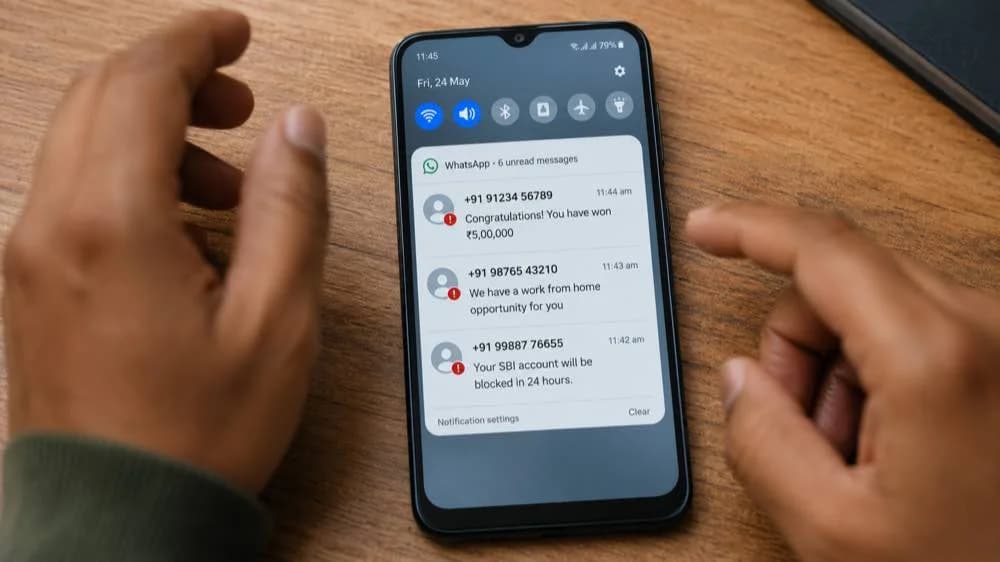
Three of the most common WhatsApp scam messages arriving in Indian inboxes every day: fake prize wins, job offers, and bank alerts.
India has more than 500 million active WhatsApp users, making it the platform's largest market in the world. Scammers know this. WhatsApp is now the primary delivery channel for financial fraud in India, used to distribute fake job offers, malicious links, bank impersonation messages, and investment scams at a scale no other platform matches.
Most of these scams arrive as messages from numbers you do not recognise. They look urgent, credible, and personally addressed. This article identifies 8 specific message formats arriving in Indian inboxes right now so you can recognise a scam in under 30 seconds.
Want the complete reference? WhatsApp Scams India Complete Prevention Guide covers all 5 scam categories with step-by-step prevention and reporting channels.
How to identify a scam WhatsApp message in India
- 1Unknown number offering jobs, prizes, or investment returns
- 2Message creates urgency: respond in 2 hours or lose your prize
- 3Contains a link check it at rakshaai.co before clicking anything
- 4Asks you to share an OTP you just received
- 5Requests installation of an app via a link, not from the Play Store
- 6International number (+1, +44, +84) offering suspicious opportunities
- 7Asks you to add a new contact who will explain the opportunity
- 8Forwarded 5 or more times viral scam content spreads this way
If even one applies, do not interact. Block and report the number.
Why WhatsApp Is Scammers' Favourite Platform in India
WhatsApp has three properties that make it uniquely valuable to fraudsters. First, messages arrive in a personal context, between family and friends, which creates a default level of trust that email or social media does not carry. Second, it is used by people across every age group and income level in India, including populations with limited digital literacy who may not recognise scam patterns. Third, phone numbers are easy to acquire and rotate, making it cheap to blast millions of messages from numbers that get blocked and replaced within hours.
WhatsApp fraud in India operates at industrial scale. Criminal networks send thousands of scam messages per day per operator, targeting every demographic with different message types calibrated to their most likely vulnerabilities: job offers for young people, investment tips for middle-class savers, prize wins for older users, and bank alerts for anyone with a mobile banking account.
The 8 Most Dangerous WhatsApp Messages in India in 2026
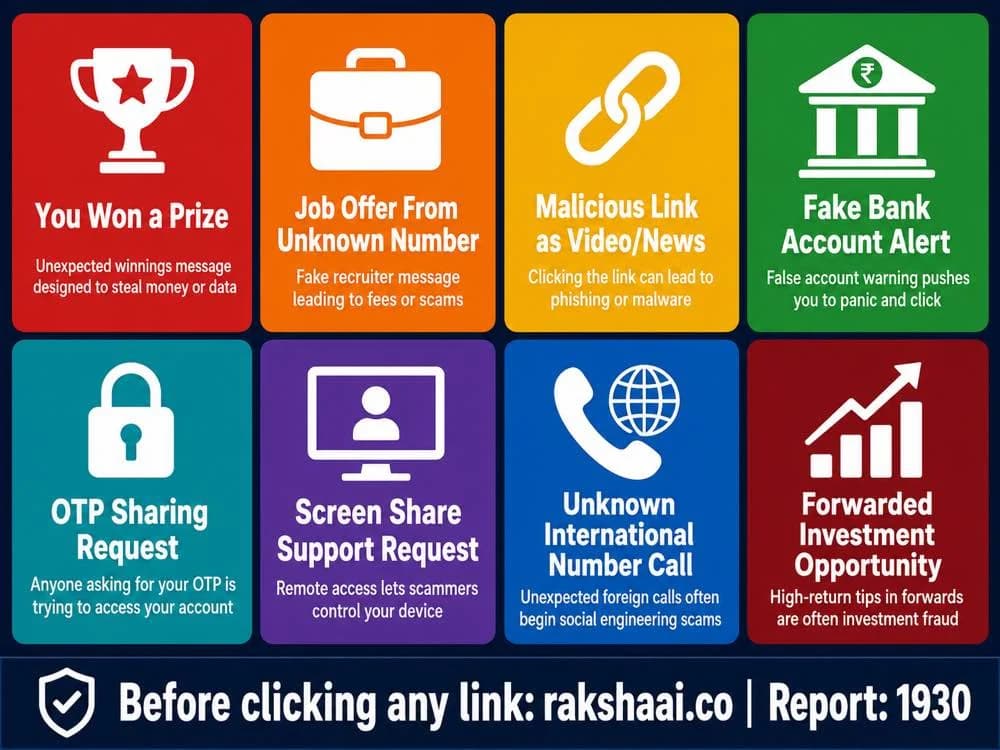
All 8 WhatsApp scam message types active in India. Each uses a different hook but the goal is identical: money or account access.
Type 1: The "You Have Won" Lottery or Prize Message
A message arrives from an unknown number congratulating you on winning a prize: cash, a smartphone, a car, or a KBC jackpot. The message claims you were selected through a lucky draw, a WhatsApp promotion, or a government scheme. To claim your prize, you are asked to share personal details, pay a "processing fee", or click a link.
No legitimate lottery or prize scheme contacts winners through an unsolicited WhatsApp message. KBC (Kaun Banega Crorepati) does not contact contestants via WhatsApp. Any message claiming you have won something you did not enter is fraud. The processing fee, if paid, is simply stolen. The link, if clicked, may install malware or harvest your banking credentials.
Rule: You cannot win a competition you did not enter. Delete and block.
Type 2: The Job Offer From an Unknown Number
A professional-sounding message offers you flexible part-time work, data entry, social media tasks, or work-from-home positions. The pay is described as unusually high for minimal effort. You are asked to respond if interested, after which you are directed to a Telegram group or asked for your personal details.
This is the WhatsApp entry point for India's Telegram task scam, one of the country's fastest-growing fraud categories. The WhatsApp message is the first contact; the actual fraud unfolds on Telegram, where victims are eventually asked to deposit money to "unlock" premium tasks. Estimated losses from this scam exceeded ₹100 crore in 2025 alone.
Rule: No legitimate employer recruits via unsolicited WhatsApp messages. Report the number and do not respond.
Type 3: The Malicious Link Disguised as a Video or News
A message arrives containing a link presented as a shocking news article, a viral video, a government announcement, or a free offer. The link text looks plausible, but the actual URL is a look-alike domain designed to phish your credentials or trigger a malware download.
These links are particularly dangerous because they are often forwarded from known contacts whose phones have already been compromised. Receiving the link from a family member's number creates a false sense of safety. The link itself, not the sender, is what determines risk.
Before clicking any link in a WhatsApp message, copy the URL and check it at rakshaai.co/website-safety-checker. If the link is a shortened URL (bit.ly, t.co, etc.), expand it first using a URL expander before checking. Never click links that prompt app installations outside the official Play Store.
Type 4: The "Your Account Is Blocked" Bank Alert
A message arrives claiming to be from your bank, stating that your account will be blocked in 24 hours due to incomplete KYC, a suspicious transaction, or a regulatory requirement. You are given a link to update your details immediately or call a number to resolve the issue.
Banks in India do not send account block warnings via WhatsApp from personal or unverified numbers. Official bank communications arrive via SMS from registered sender IDs or through the bank's own app notifications. The link in these messages leads to a fake bank login page that captures your credentials. The phone number, if called, connects to a fraud operator who will attempt to extract your OTP.
For a deeper breakdown of this pattern, see our guide on the KYC update scam targeting Indian bank accounts. If you receive any bank alert via WhatsApp, contact your bank only through the official app or the number printed on the back of your card.
Type 5: The OTP Sharing Request
Someone messages you claiming to be a friend, a bank representative, or a service provider, and says they accidentally sent an OTP to your number or need you to forward an OTP for a legitimate reason. The moment you share the OTP, your account is compromised.
OTPs are single-use authentication codes. They serve one purpose: to verify that the person initiating a transaction controls the registered phone number. Sharing an OTP with anyone else is functionally identical to handing over your account password. There is no legitimate scenario in which a bank, service provider, or contact needs you to forward an OTP to them.
This same principle applies to your WhatsApp registration OTP specifically. If a scammer can get your 6-digit WhatsApp OTP, they can take over your entire account and use it to scam your contacts.
Rule: Never share any OTP with anyone, for any stated reason. No exception exists.
Type 6: The Screen Share "Support" Request
A caller claims to be from your bank's technical support, a telecom provider, or a government helpline and asks you to install a screen-sharing app (AnyDesk, TeamViewer, QuickSupport) so they can "fix your account" or "verify your identity". Once you share your screen, they can see everything on your phone in real time, including banking apps, OTPs, and passwords.
No legitimate bank or government service in India will ever ask you to install a remote access app to resolve an account issue. The existence of this request, by itself, confirms you are speaking with a scammer. End the call immediately.
If you have already shared your screen with an unknown caller, assume your banking apps have been compromised. Change all passwords, disable internet banking temporarily, and call 1930 immediately.
Type 7: The Unknown International Number Call
You receive a WhatsApp call or message from an international number you do not recognise, typically from the United States (+1), United Kingdom (+44), Vietnam (+84), Indonesia (+62), or other countries. The caller offers a job, an investment opportunity, or a romantic connection.
Scam call centres operating from Southeast Asian countries routinely use international SIM cards or VoIP numbers to appear credible to Indian recipients. The use of a foreign number is partly designed to trigger curiosity, and partly to suggest a high-paying international employer or an NRI contact, both of which carry status associations that lower suspicion.
Unsolicited calls from international numbers you do not recognise should be treated as suspect by default. If the offer involves money, a job, or a romantic relationship, the probability of fraud is extremely high.
Type 8: The Forwarded Investment Opportunity
A message, often forwarded multiple times, promotes a stock tip, a crypto investment platform, or a trading group promising guaranteed returns of 20 to 40 percent per month. The message may include screenshots of profits, links to join a Telegram investment group, or testimonials from apparent beneficiaries.
Guaranteed investment returns do not exist in any legitimate financial market. The forwarded format is used deliberately: it creates an impression of peer validation, as if people in your own network are benefiting. The screenshots are fabricated. The Telegram group is controlled by scammers. The "profits" shown in the dashboard are fictional figures designed to keep you depositing more money.
Any investment opportunity that arrives via WhatsApp forward and promises fixed returns is fraud. SEBI-registered advisors do not recruit clients through forwarded WhatsApp messages.
How to Identify a Scam WhatsApp Message in 30 Seconds
Most scam messages share structural characteristics that make them identifiable before you read a single word of the content. Run through this check the moment any message from an unknown number arrives.
- Is the number unknown to you? If you do not have the sender saved as a contact, apply maximum suspicion to any message offering money, jobs, or prizes.
- Does it create urgency? Phrases like "respond within 2 hours", "your account will be blocked today", or "limited slots available" are manufactured pressure designed to prevent you from thinking clearly.
- Does it contain a link? Do not tap it. Copy the URL and check it at rakshaai.co first.
- Does it ask for an OTP, password, or personal detail? No legitimate service ever requests these via WhatsApp.
- Is it an international number? Unsolicited calls or messages from foreign numbers offering opportunities are almost always fraud.
- Has it been forwarded multiple times? WhatsApp labels heavily forwarded messages. High forward counts on messages offering money or prizes indicate mass-distributed scam content.
If any one of these applies, do not interact. Long-press the message, tap Report, and block the number. Then run the number through rakshaai.co/phone-number-checker to see if others have already flagged it.
WhatsApp Safety Settings Every Indian Should Enable Today
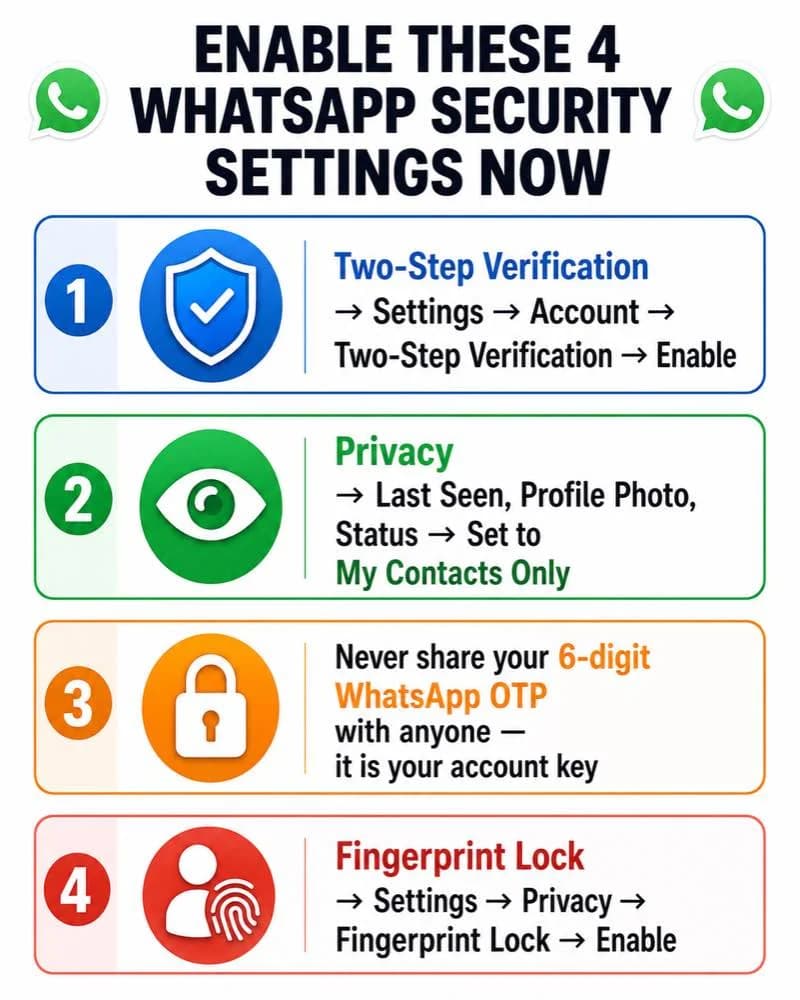
These four settings take under 3 minutes to enable and significantly reduce your exposure to WhatsApp scams.
- Enable Two-Step Verification. Go to Settings, then Account, then Two-step verification, then Enable. This adds a 6-digit PIN that must be entered when registering your number on a new device. Even if a scammer gets your registration OTP, they cannot take over your account without this PIN.
- Restrict your privacy settings. Go to Settings, then Privacy. Set Last Seen, Profile Photo, and Status to "My Contacts Only". This prevents unknown numbers from profiling you before initiating contact.
- Never share your 6-digit registration OTP. When you install or reinstall WhatsApp, you receive a 6-digit code via SMS. This code is your account key. Anyone who asks you to forward it is attempting to take over your account. There is no legitimate reason for anyone to need this code from you.
- Enable Fingerprint or Face Lock. Go to Settings, then Privacy, then Fingerprint Lock (Android) or Face ID/Touch ID Lock (iPhone). This prevents anyone with physical access to your phone from reading your messages or initiating transactions.
What To Do If You Clicked a Suspicious Link
Act in the next 10 minutes. The faster you respond, the higher the chance of preventing account compromise or financial loss.
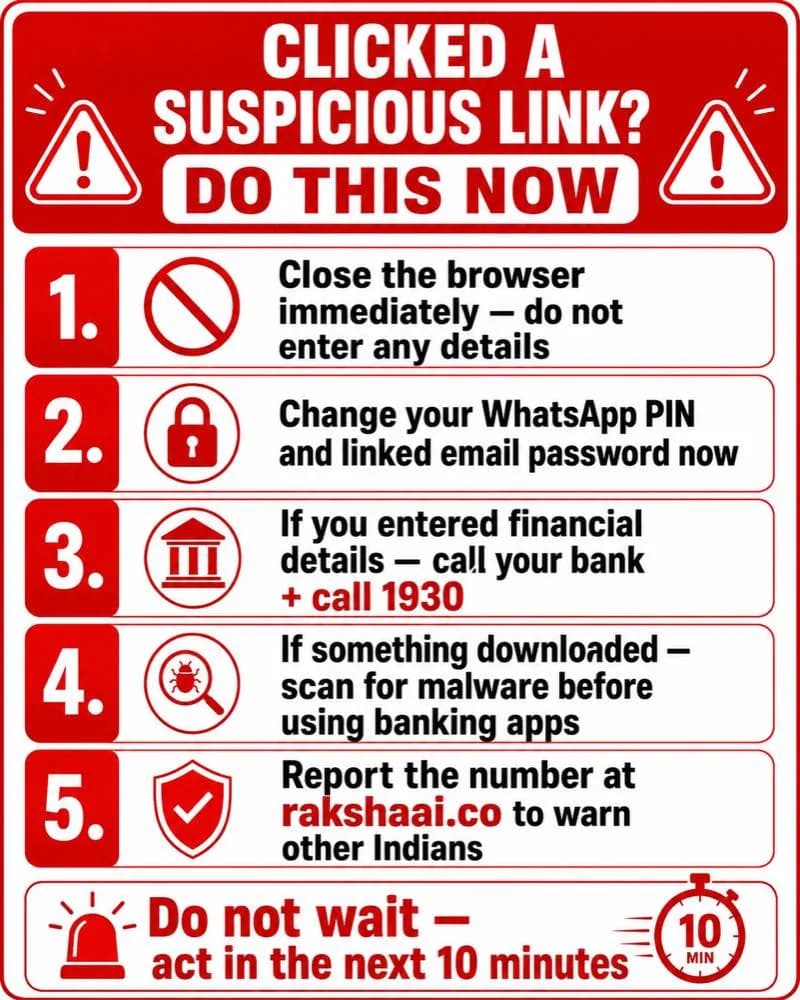
Five steps to take immediately after clicking a suspicious WhatsApp link. Do not wait.
- Close the browser immediately. Do not enter any details on the page that opened, even if it looks like your bank, a government site, or a prize claim form.
- Change your WhatsApp PIN and linked email password. Do this now, before anything else. If the link was designed to steal your login session, changing passwords limits the window of access.
- If you entered financial details, call your bank and 1930 immediately. Ask your bank to temporarily freeze your account and raise a fraud dispute. Call 1930 to file a cybercrime complaint in real time.
- If anything downloaded, scan for malware before opening banking apps. Use a trusted mobile security app to scan your device. Do not open any banking or payment app until the scan is complete.
- Report the number at RakshaAI. Submit the sender's number at rakshaai.co so it is flagged for other Indians before they receive the same message.
For a full recovery guide after any online fraud, see Got scammed online in India? Do these 5 things in 30 minutes.
Frequently Asked Questions
How do I report a scam WhatsApp number in India?
Long-press the message, tap Report, and select the reason. Also report the number at rakshaai.co to warn other Indians. For financial fraud, call 1930 and file at cybercrime.gov.in.
Is a WhatsApp call from an international number always a scam?
Not always, but be highly suspicious of unsolicited calls from international numbers (+1 USA, +44 UK, +84 Vietnam, +62 Indonesia) offering jobs or investments. Legitimate international contacts are usually known to you. Scam call centres often use these country codes.
What happens if I click a suspicious WhatsApp link?
Immediately close the browser. Do not enter any details on the page that opened. Change your WhatsApp PIN and linked email password. If you entered any financial details, call 1930 immediately. Run a malware scan if the link prompted any app download.
Can WhatsApp messages steal my money without me sending anything?
Some malicious links install malware that can access your banking apps or capture OTPs in the background. Never click unknown links on WhatsApp. Check any link at rakshaai.co before tapping.
How do I make my WhatsApp more secure against scams?
Enable Two-Step Verification under Settings, Account, Two-step verification. Never share your 6-digit WhatsApp registration OTP with anyone. Set your last seen, profile photo, and status to My Contacts only. Enable Fingerprint Lock under Privacy settings.
Final Thoughts
WhatsApp scams in India work because they arrive in a channel built on personal trust and exploit the speed at which people respond to messages. The 8 patterns in this article account for the overwhelming majority of WhatsApp-based financial fraud in India today.
The protection is simple: check before you click, never share an OTP with anyone, and treat any unsolicited message offering money or a job as a scam until proven otherwise. Enable two-step verification today if you have not already. It takes two minutes and closes the most common WhatsApp account takeover method completely.
Share this article via WhatsApp with your family and parents specifically. Older family members are disproportionately targeted by prize scams and fake bank alerts. A single conversation about these patterns could prevent a significant financial loss.
Free Tool
Got a suspicious WhatsApp message or link?
Check any phone number, website link, or UPI ID on RakshaAI before responding. No sign-up. No cost. Results in under 5 seconds.
Check a Number or Link now →100% free · No sign-up required · Save 1930 in your contacts
More from RakshaAI Blog
Electricity Bill Scam India: That Disconnection Today SMS Is Always Fake

AI Scam India: How Artificial Intelligence Is Making Fraud More Dangerous in 2026
Credit Card Fraud India 2026: How Scammers Clone and Misuse Your Card
Stay Protected Online
Use RakshaAI to check websites, phone numbers, and UPI IDs for scams free, instant, no sign-up required.
RakshaAI is a private platform by Ehatech Services Pvt. Ltd. Not affiliated with any government body. Editorial policy