
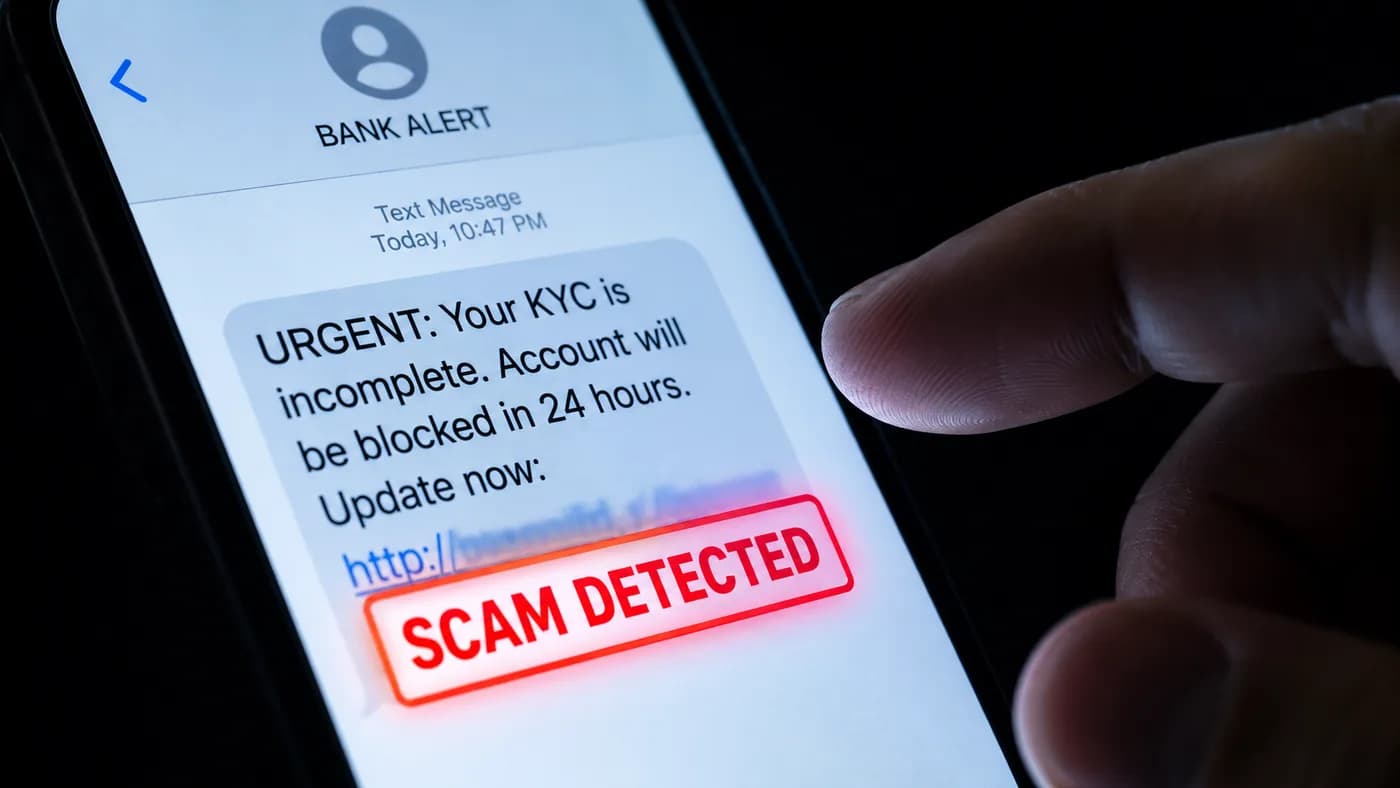
Scammers create SMS messages that look identical to real bank alerts. The only way to be safe is to never click and always go to your official bank app directly.
Your phone buzzes. A message arrives from what looks like your bank: "URGENT: Your KYC is incomplete. Your account will be blocked in 24 hours. Update now." Below the message is a link. Thousands of Indians click that link every day. Most lose access to their bank accounts.
KYC update fraud is India's most widespread banking scam in 2026. It works because it exploits a real process (banks do require KYC updates) and creates panic (24-hour deadline, account blocked). This guide shows you exactly how to tell a real KYC request from a scam in under 30 seconds.
How to identify a fake KYC SMS from your bank in India
- 1Real KYC never has a "24-hour account blocked" deadline
- 2Real KYC directs to your branch or official app, never an external link
- 3Real bank officers never ask for your OTP over phone or SMS link
- 4Compare the sender ID against your bank's previous legitimate SMS
- 5Call your bank from the number on your card, not any number in the SMS
- 6Check any suspicious link at rakshaai.co before clicking it
Your bank's official app shows all real KYC requirements under Settings or Profile. Always go there first.
Why KYC Scams Work So Well on Indian Bank Customers
KYC (Know Your Customer) is a genuine regulatory requirement. Indian banks must verify customer identity periodically under RBI guidelines. Scammers exploit this in three ways:
- Legitimacy. Because real KYC requests do exist, the concept is familiar and trusted. Scammers copy the exact language used in real bank communications.
- Urgency. The "24 hours or your account will be blocked" threat triggers panic. When people are afraid, they act before they think.
- Personalization. Scammers buy stolen data from breaches. Your SMS may include your name, partial account number, and the correct bank name, making it look completely authentic.
The result is a scam that looks like a routine banking task. Most victims realize something was wrong only when they check their account and find it drained.
The 5 Versions of KYC Fraud in India in 2026
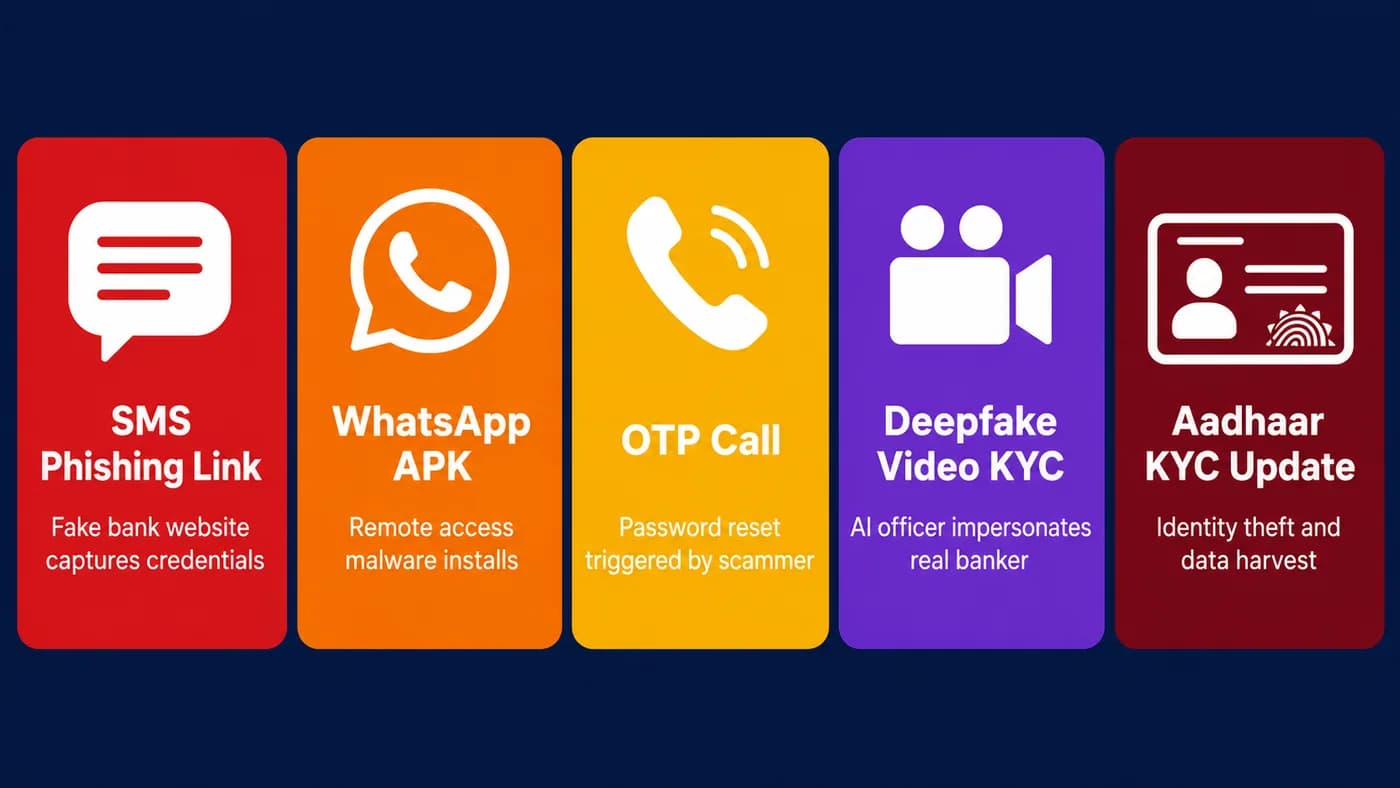
KYC fraud comes in five distinct forms. Each uses a different entry point but the same goal: steal your banking credentials.
Version 1: The SMS Phishing Link
This is the most common variant. An SMS arrives with a link that opens a fake bank website. The site looks identical to your real bank's login page. You enter your credentials. The scammer now has your username, password, and whatever OTP you enter next.
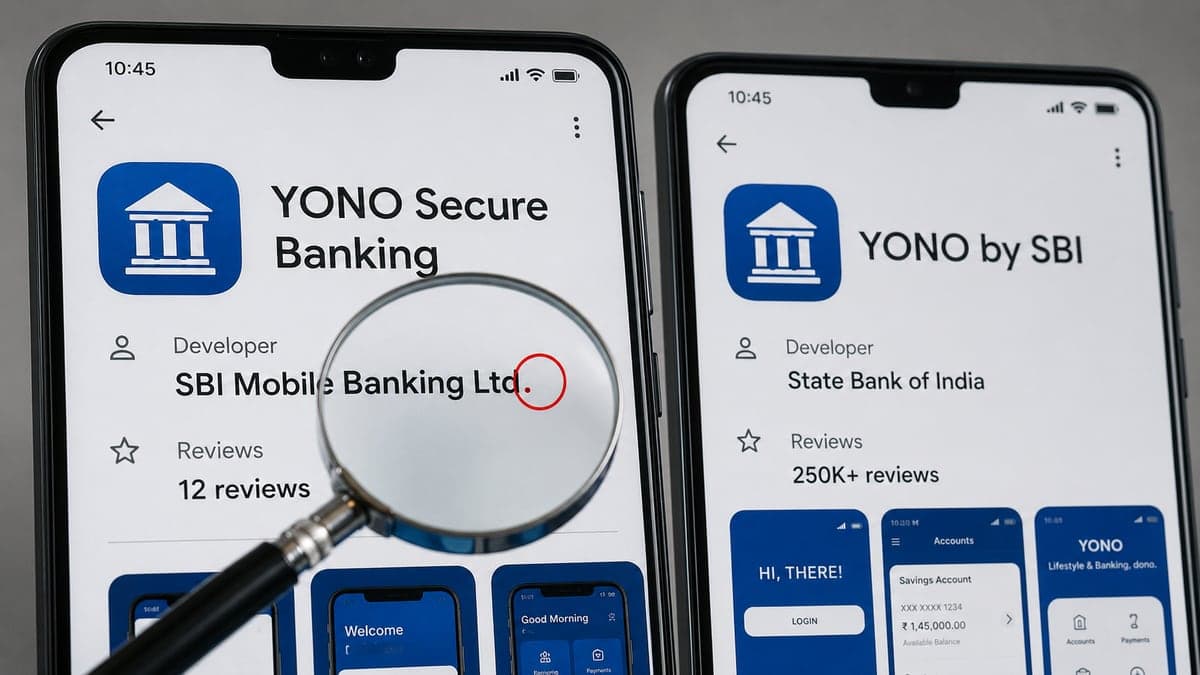
The fake website is usually hosted on a domain that looks almost right: sbi-kyc-update.com, hdfcbank-verify.in, icici-kyc.net. The real bank domain ends only at sbi.co.in, hdfcbank.com, or icicibank.com. Any extra word or variation in the domain means fraud.
Version 2: The WhatsApp APK
A message arrives on WhatsApp from an unknown number claiming to be from your bank. It includes a file attachment. The file is an APK (Android app). If you install it, it becomes a Remote Access Trojan (RAT) that gives scammers full control of your phone, including your banking apps and any OTP that arrives.
Rule: Real banks never send APK files. Never install any app outside the Google Play Store or Apple App Store, regardless of who sent it.
Version 3: The Phone Call with OTP Request
A caller introduces themselves as a bank KYC officer. They say your account will be blocked and they need to verify your identity. They ask you to read out an OTP that arrives on your phone "to confirm your details." That OTP is actually a password reset or transaction authorization for your account. Reading it out hands full control to the scammer.
Rule: No bank officer, KYC agent, or RBI representative will ever ask for your OTP over a phone call. End the call immediately and report the number at rakshaai.co/phone-number-checker.
Version 4: The Video KYC Deepfake
This is the most sophisticated variant. A scammer poses as a bank official on a video call and uses AI-generated facial overlays to appear as a uniformed bank employee. They ask you to show your Aadhaar card and PAN on camera, then walk you through entering your OTP on a link they share. Both the identity document and your OTP go directly to the scammer.
Version 5: The Aadhaar KYC Update Scam
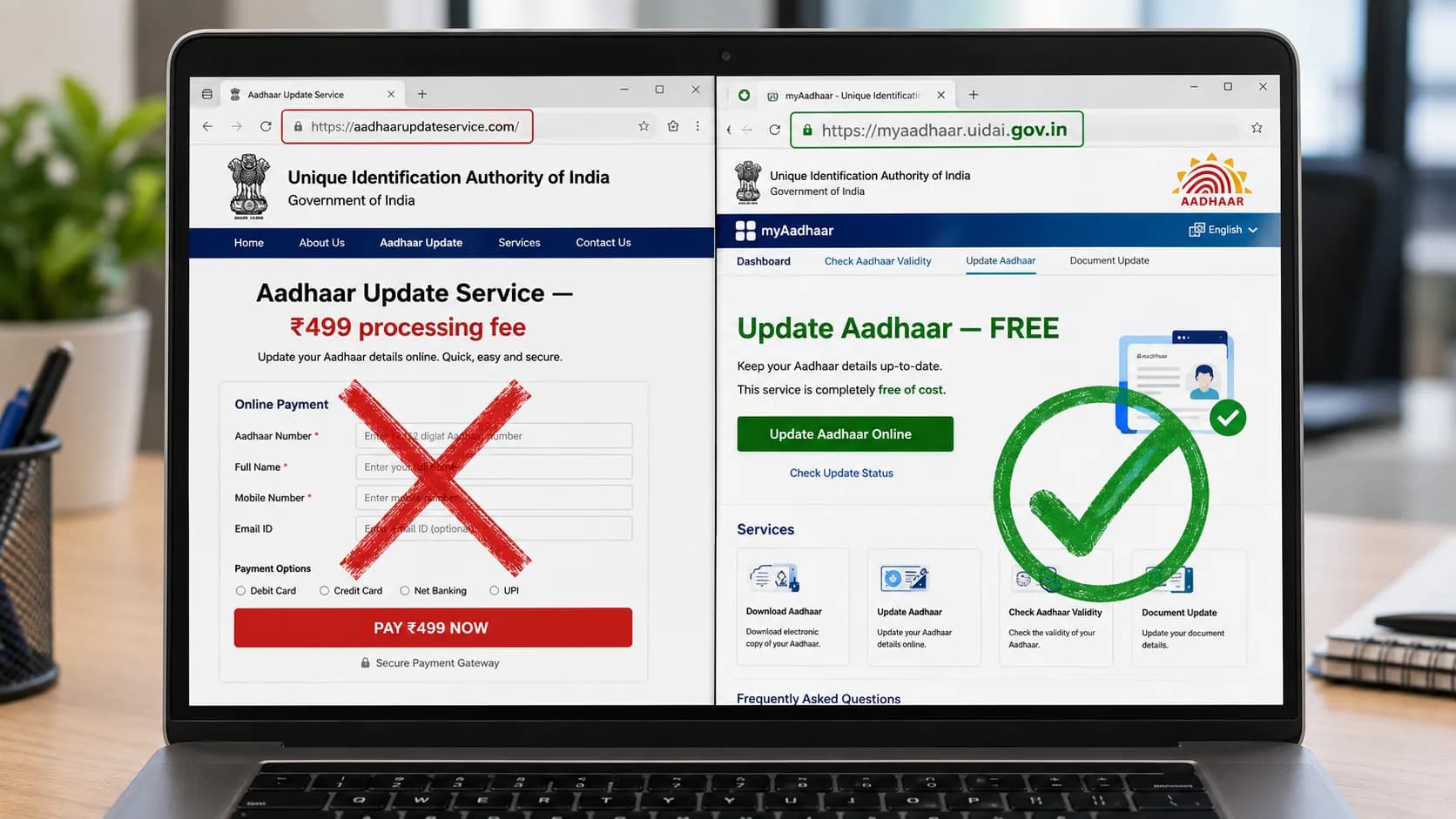
An SMS or call claims your Aadhaar-linked KYC needs updating and directs you to a fake UIDAI portal. The website collects your Aadhaar number, date of birth, and OTP. This is enough to perform identity theft and open fraudulent accounts or loans in your name.
Real Aadhaar KYC updates happen only at myaadhaar.uidai.gov.in, at a licensed Aadhaar Seva Kendra, or through your bank's official app. There is no legitimate Aadhaar KYC link that arrives by SMS.
Real vs Fake KYC: How to Tell the Difference in 30 Seconds
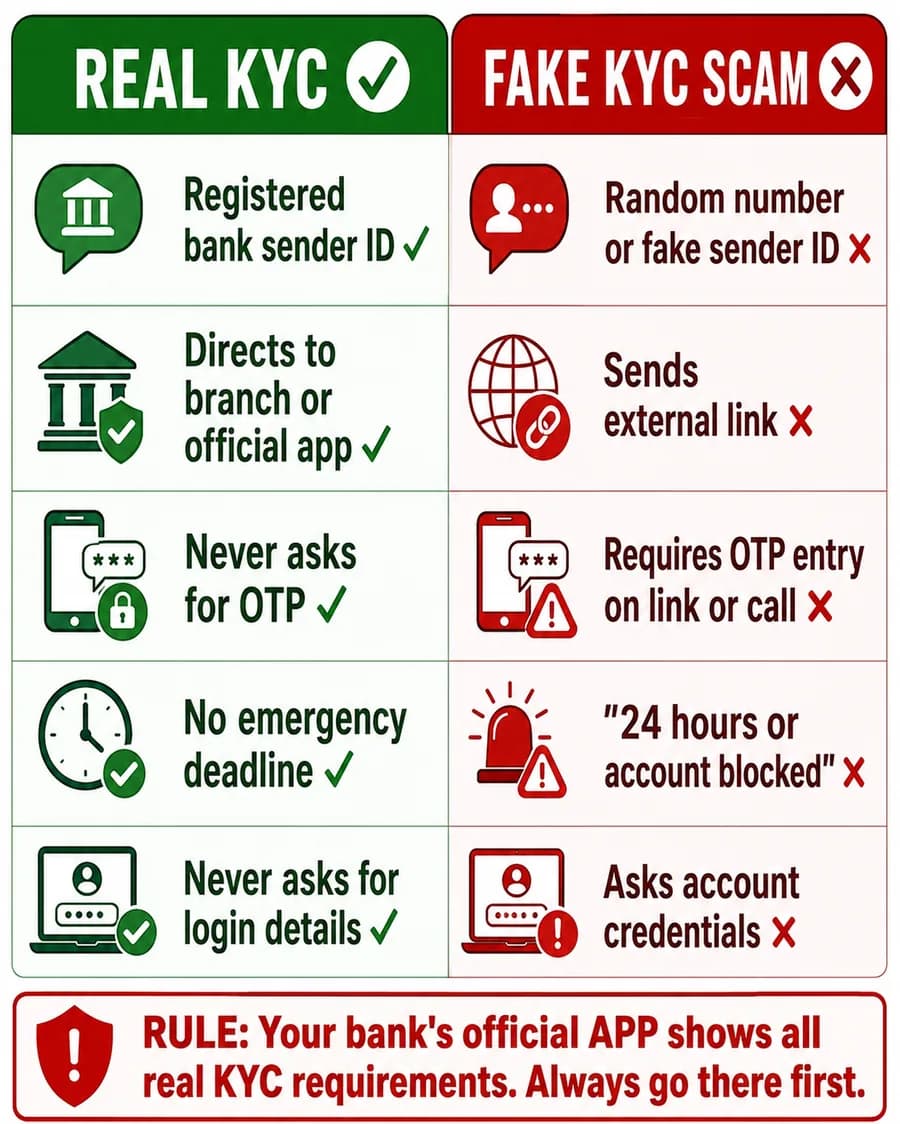
Save this image. Share it with your family.
The fastest way to identify a scam KYC message is to check these five signals. Real bank KYC communications pass all five. Fake ones fail at least one.
- Sender ID. Real banks send from registered sender IDs like AD-SBIINB or BW-HDFCBK. Scam messages arrive from random mobile numbers (10-digit numbers starting with 7, 8, or 9) or from slightly altered IDs.
- Link destination. Real KYC directs you to your branch or official app. It never sends you to an external website link via SMS. If there is a link, it is fake.
- OTP request. Real KYC processes never ask for your OTP over phone, link, or video call. OTPs are only entered inside your official bank app for legitimate transactions.
- Urgency deadline. Real KYC notices give you weeks or months, not 24 hours. Any message saying "account blocked in 24 hours" is using a pressure tactic to stop you thinking clearly.
- Login credential request. Real KYC never asks for your net banking username, password, card number, or CVV. If a website or caller asks for these, stop immediately.
5 Rules to Stay Safe from KYC Fraud
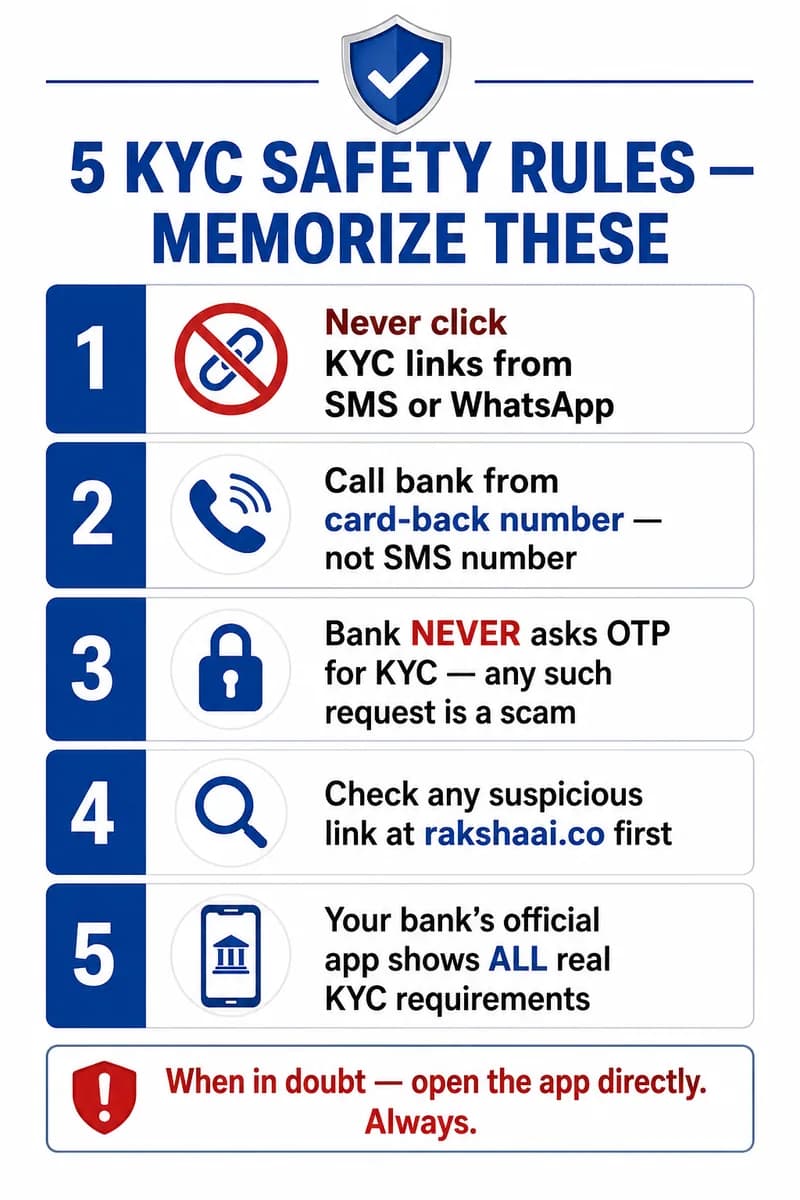
Memorize these 5 rules. Share this with everyone who uses online banking.
- Never click KYC links from SMS or WhatsApp. Open your bank app directly by typing the URL yourself or using the app you already have installed.
- Call your bank from the number on your card, not the SMS. The phone number on the back of your debit or credit card is always the correct number. The number in an SMS may route you to a scammer.
- Your bank never asks for OTP for KYC. Any OTP request during a supposed KYC process is a 100% scam signal. Hang up or close the browser immediately.
- Check any suspicious link at RakshaAI before clicking. Paste the URL from the SMS into rakshaai.co/website-safety-checker. Fake bank portals are flagged instantly.
- Your bank's official app shows all real KYC requirements. Open the app and look under Profile, Settings, or Notifications. If there is a real KYC requirement, it will appear there. If it does not appear in the app, the SMS is fake.
If You Already Clicked and Entered Details
Time is critical. The first 30 minutes after clicking a phishing link have the highest account recovery rate. Call 1930 before doing anything else.
- Call 1930 immediately. India's National Cybercrime Helpline can flag fraudulent accounts before money is withdrawn. Give them the full details of what happened, which bank is affected, and any transaction reference you have.
- Call your bank's fraud helpline. Ask them to temporarily freeze internet banking access to your account. The number is on the back of your card.
- Change your net banking password immediately. Do this on your official bank app or website, not through any link. Log out of all sessions.
- Report your UPI accounts in your payment apps. Open PhonePe, Google Pay, Paytm, or BHIM and change your UPI PIN from inside the app.
- File a complaint at cybercrime.gov.in. A formal complaint creates a legal record and supports account recovery. You can also report the phishing link at rakshaai.co to protect other users.
Frequently Asked Questions
Is the KYC update SMS from my bank real?
Possibly, but always verify by calling your bank from the number on the back of your card. Never click KYC links from SMS or WhatsApp. Open your bank's official app and check for any KYC requirement listed under Profile or Settings. If no requirement appears in the app, the SMS is not from your bank.
What happens if I click a fake KYC link?
The fake website captures your login credentials. If you also entered an OTP on the site, the scammer may now have the ability to reset your UPI PIN and access your linked bank accounts. If you clicked and entered any details, call your bank and 1930 immediately. Do not wait.
Does Aadhaar-based KYC actually expire in India?
Banks do require periodic Aadhaar KYC re-verification under RBI guidelines. However, legitimate Aadhaar KYC updates happen through official bank channels: a branch visit, the bank's official app, or the UIDAI portal at myaadhaar.uidai.gov.in. No real Aadhaar KYC update ever arrives through an SMS link.
Will my bank ever ask for my OTP for KYC verification?
Never. No bank, KYC portal, or government body will ever ask for your OTP over a phone call, SMS link, or video call. OTPs are one-time authorization codes for transactions or password resets. Any person or website that asks you to read out or enter an OTP for KYC purposes is a scammer.
How do I check if a KYC link is safe before clicking?
Paste the URL from the SMS into rakshaai.co/website-safety-checker before opening it. Fake banking portals are flagged in the RakshaAI database instantly. Also look at the domain name: your bank's real domain has no extra words or hyphens. Any variation means the link is fake.
Final Thoughts
KYC scams are effective because they exploit a real banking requirement and use manufactured panic to override your judgment. The "24-hour deadline" is always fake. Your bank will not block your account over an SMS with no prior in-app notice.
The single habit that stops every KYC scam: never act on an SMS or WhatsApp message about your bank account. Open the official app directly. Every real banking requirement will appear there. If it does not appear in your app, the message is not from your bank.
Share this article with your parents and grandparents. Senior citizens are targeted most often because they may be less familiar with how scam messages are constructed. Two minutes of reading could protect an entire family's savings.
Free Tool
Got a suspicious link from an SMS?
Paste any link from a KYC SMS or WhatsApp message into RakshaAI. We check it against phishing databases instantly. Free. No sign-up. Results in under 5 seconds.
Check the link now →100% free · No sign-up required · Save 1930 in your contacts
More from RakshaAI Blog
Stay Protected Online
Use RakshaAI to check websites, phone numbers, and UPI IDs for scams free, instant, no sign-up required.
RakshaAI is a private platform by Ehatech Services Pvt. Ltd. Not affiliated with any government body. Editorial policy