
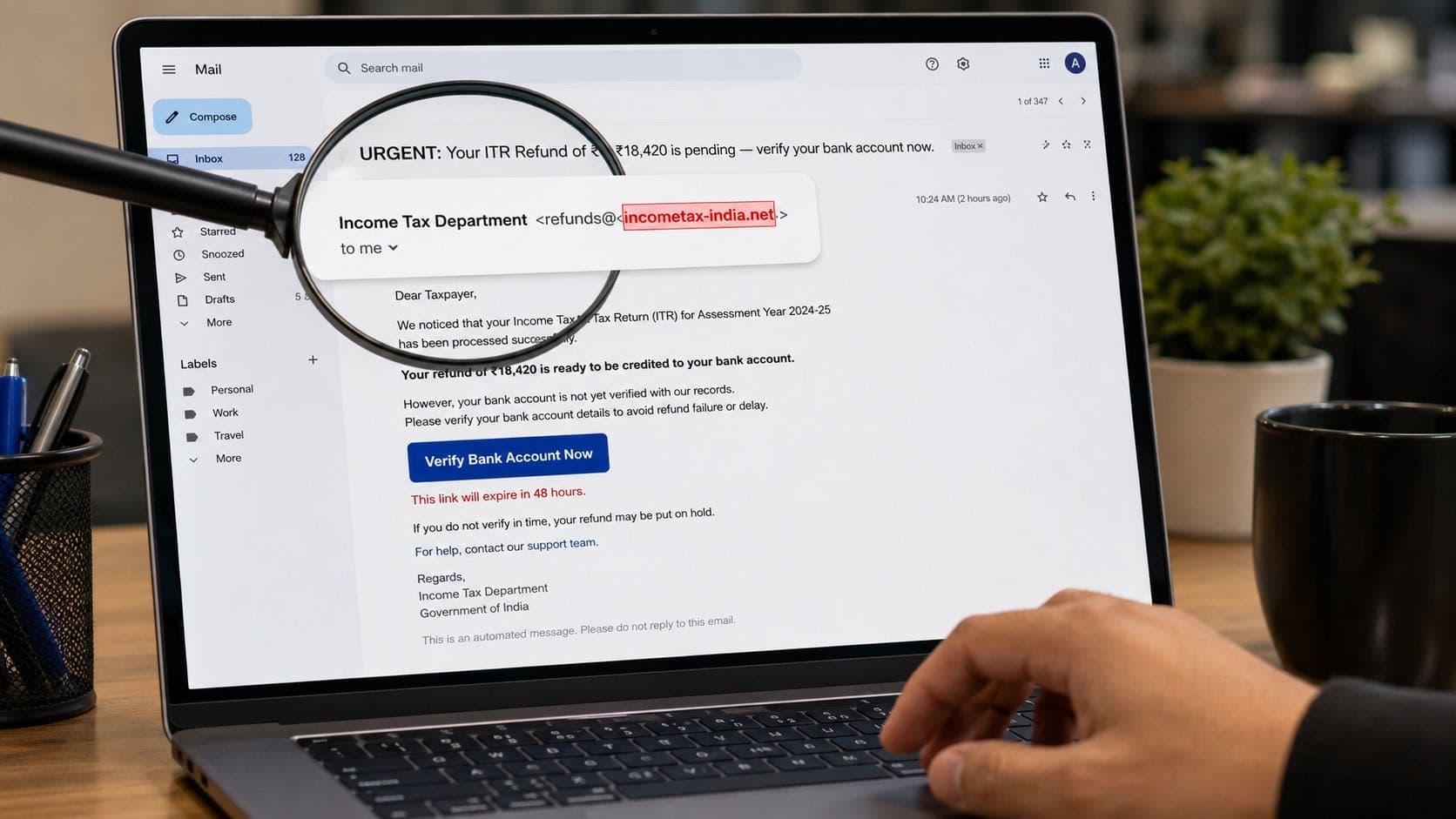
A fake Income Tax Department email with the wrong sender domain highlighted. One click could compromise your bank account.
Phishing attacks in India surged past every previous record in 2026. The emails look professional, reference real government departments, and create enough urgency that most people click before thinking. Fake income tax refund emails, fake EPFO notifications, and fake bank security alerts are arriving in millions of Indian inboxes every single day.
The difference between a real government email and a phishing email often comes down to a single detail: the sender domain. This article breaks down the 6 most impersonated senders, 8 signs that expose every phishing email, and a 30-second check that protects you before you click anything.
Already clicked a suspicious link? Do these 5 things in 30 minutes to limit the damage and start recovery.
How to identify a phishing email in India
- 1Sender email domain is wrong (incometax-india.net instead of incometax.gov.in)
- 2Creates urgency: "your account will be closed in 24 hours"
- 3Contains a link that does not match the real website when you hover
- 4Asks you to click a link to verify OTP, password, or bank details
- 5Generic greeting: "Dear Customer" instead of your actual name
- 6Grammar errors or unusual phrasing in what claims to be an official email
- 7Attachment you were not expecting, especially .zip, .exe, or .pdf files
- 8The email address changes slightly from the real one: extra letter, hyphen, or wrong TLD
Paste any suspicious link into rakshaai.co before clicking.
Why India Is a Prime Target for Phishing Emails in 2026
India has more than 900 million internet users, with hundreds of millions accessing email for the first time in the last three years. This rapid digital adoption happened faster than digital literacy could keep up. Most new email users in India have never been taught how to verify a sender domain, check an email header, or hover over a link before clicking.
At the same time, critical services like income tax filing, EPFO withdrawals, bank account management, and government scheme applications have all moved online. Every Indian with an email address now receives legitimate communication from government agencies. Scammers exploit this by sending emails that look identical to real government notifications, knowing that most recipients will not check the sender domain before clicking.
India ranked among the top 5 countries globally for phishing attacks in 2025, and the trend accelerated into 2026. The most targeted sectors are banking, government services, and e-commerce, which together account for over 75% of all phishing emails sent to Indian addresses.
The 6 Most Impersonated Senders in Indian Phishing Emails
Fake Income Tax Department Emails
The most common phishing email in India impersonates the Income Tax Department. These emails typically arrive during ITR filing season (July to September) and claim that a refund is ready, a return has an error, or an account needs verification. The email includes a link to a fake portal that looks identical to the real incometax.gov.in website.
The critical difference: the real Income Tax Department sends emails only from the @incometax.gov.in domain. Phishing versions use domains like incometax-india.net, incometaxrefund.com, or it-refunds-india.org. The IT department never asks for your OTP, PAN card photo, or bank login credentials via email.
Fake Bank Security Alerts
These emails claim your bank account has been compromised, your card is blocked, or a suspicious transaction was detected. They ask you to click a link to verify your identity or update your security settings. The fake portal captures your net banking credentials and OTPs in real time.
Banks in India send transaction alerts via SMS from registered sender IDs, not via email links. If you ever receive an email asking you to click a link to fix a bank issue, it is a phishing attempt. Open your banking app directly or call the number on the back of your card.
Fake EPFO / PF Account Notifications
Employees across India receive fake emails claiming their PF withdrawal is ready, their UAN needs updating, or their employer has submitted incorrect details. The emails use EPFO branding and link to a fake login page that harvests UAN credentials and Aadhaar numbers.
EPFO communications come only from @epfindia.gov.in. Any email from epfo-india.com, epf-services.net, or similar domains is fake. Check your PF balance only through the official EPFO portal or the UMANG app.
Fake IRCTC / Train Booking Alerts
These emails claim your train booking has been cancelled, your IRCTC account needs verification, or a refund is pending for a recent cancellation. The link leads to a clone of the IRCTC login page. Since millions of Indians book trains online, these emails have a high hit rate.
IRCTC sends booking confirmations from @irctc.co.in. Any email from irctc-booking.com or irctc-india.net is fraudulent. Log in to irctc.co.in directly to check any booking-related issue.
Fake Job Offer Emails From MNCs
Graduates and job seekers receive emails claiming they have been shortlisted for interviews at companies like TCS, Infosys, Wipro, or Amazon. The email includes a link to complete a registration form or download an offer letter. The form harvests personal data including Aadhaar and PAN numbers. The downloaded file may contain malware.
Legitimate companies send interview invitations from their official corporate domains, not from Gmail, Yahoo, or random .com addresses. No real employer asks for Aadhaar or PAN details before an interview.
Fake Delivery Notifications From Courier Companies
With e-commerce booming in India, fake delivery emails have become extremely effective. These claim a parcel could not be delivered, a customs fee needs to be paid, or an address update is required. The link leads to a payment page that captures card details.
For a complete breakdown of this scam, see our guide on fake delivery SMS scams in India. The same principles apply to email versions: never pay a fee through an email link. Track your delivery only through the official courier or e-commerce app.
8 Signs an Email Is a Phishing Attempt
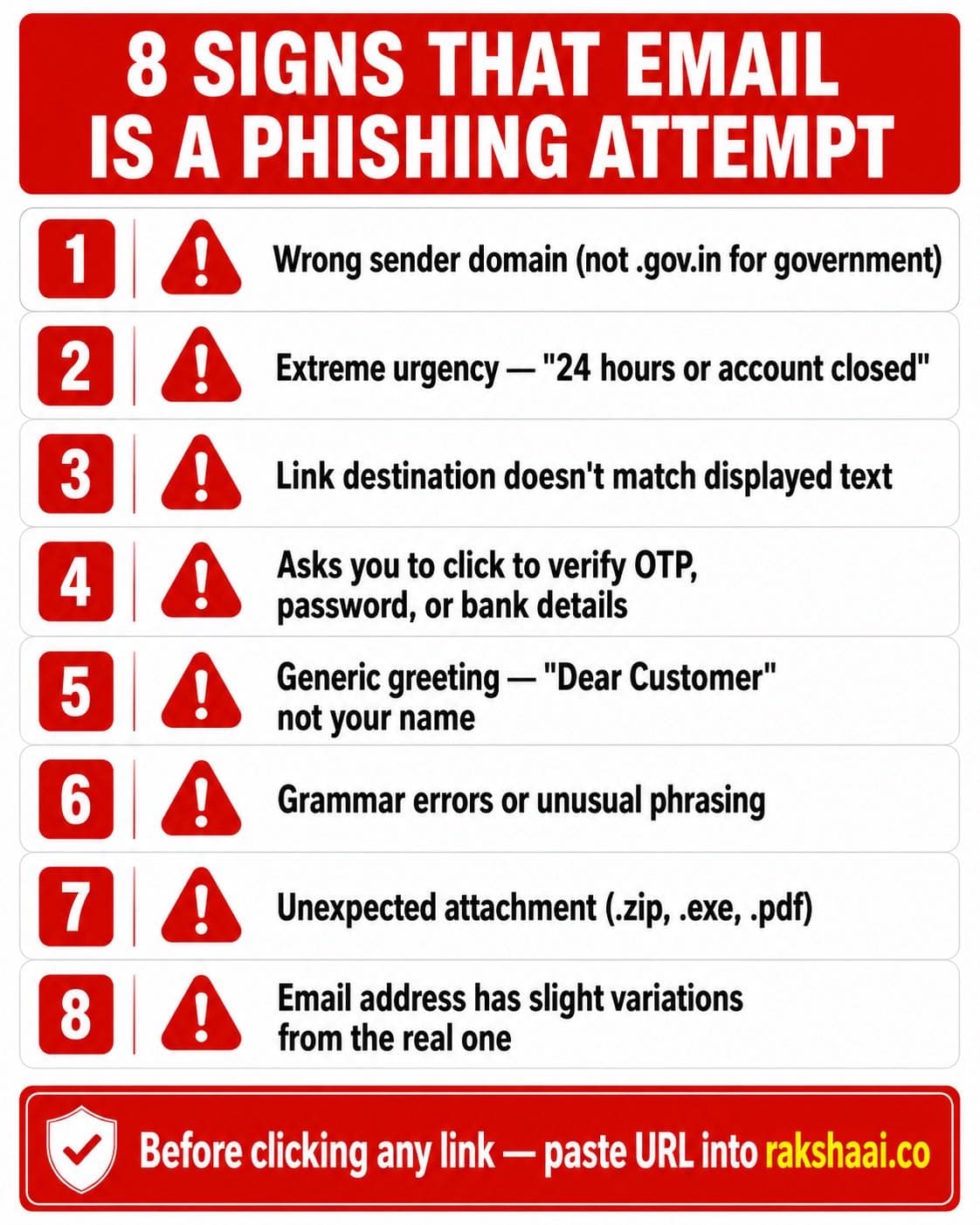
All 8 signs that an email is a phishing attempt. If even one applies, do not click anything.
Sign 1: The Sender Domain Is Wrong
This is the single most reliable indicator. Every Indian government department uses .gov.in domains. If an email claims to be from the Income Tax Department but comes from incometax-india.net or it-refund.com, it is fake. No exception.
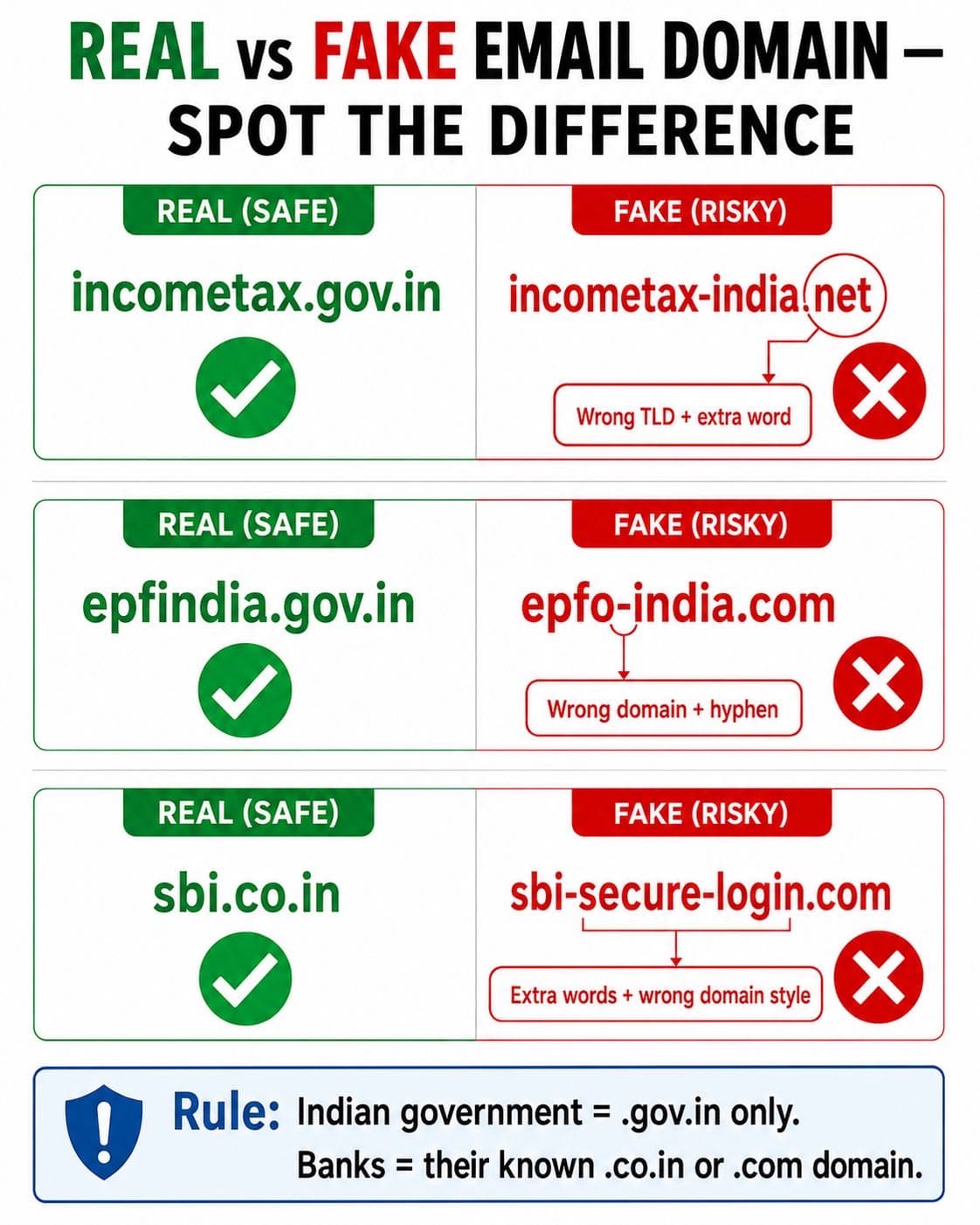
Indian government domains always end in .gov.in. Banks use their known .co.in or .com domain. Everything else is suspicious.
Sign 2: Extreme Urgency
"Your account will be blocked in 24 hours." "Refund expires today." "Immediate action required." Phishing emails create artificial deadlines because urgency overrides critical thinking. Real government agencies and banks provide reasonable notice periods and never threaten instant account closure via email.
Sign 3: The Link Destination Does Not Match the Display Text
The email says "Click here to verify at incometax.gov.in" but when you hover over the link (without clicking), the actual URL shows something completely different, like verify-refund-india.xyz. This mismatch is a clear phishing indicator.
Sign 4: Asks You to Click a Link to Verify OTP, Password, or Bank Details
No legitimate Indian bank, government agency, or service provider will ever send you an email link asking you to enter your OTP, password, or bank account details. If an email asks for any of these, it is a phishing attempt. Period.
Sign 5: Generic Greeting Instead of Your Name
Real communications from your bank or the Income Tax Department address you by name because they have your records. Phishing emails use "Dear Customer", "Dear Taxpayer", or "Dear Account Holder" because the scammer does not know your name.
Sign 6: Grammar Errors or Unusual Phrasing
While AI-generated phishing emails are improving, many still contain spelling mistakes, awkward phrasing, or inconsistent formatting that would not appear in official government or banking communications. Read the email carefully before taking any action.
Sign 7: Unexpected Attachment
Government agencies in India do not send unsolicited email attachments. If an email claiming to be from the IT Department, EPFO, or your bank includes a .zip, .exe, .pdf, or .doc attachment you were not expecting, do not download it. These attachments may contain malware that captures your banking credentials and OTPs.
Sign 8: Email Address Has Slight Variations From the Real One
Scammers use email addresses that look almost identical to real ones. An extra hyphen, a swapped letter, or a different top-level domain (.net instead of .gov.in) are all tactics designed to pass a quick glance. Always check the full sender email address character by character.
How to Check the Real Sender of Any Email in 30 Seconds
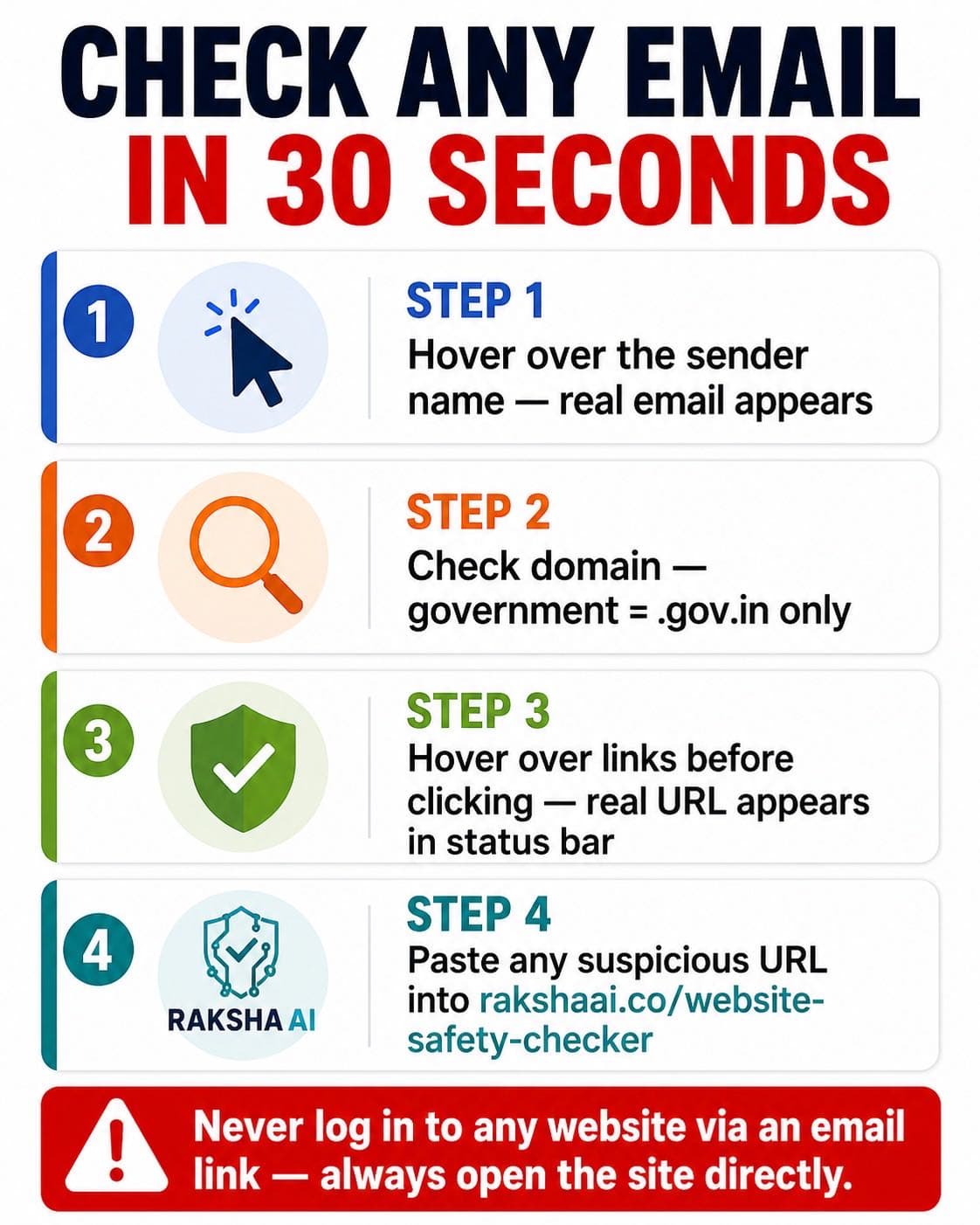
Four steps to verify any email in 30 seconds. Do this every time before clicking any link.
- Hover over the sender name. In Gmail, Outlook, and most email clients, clicking or hovering on the sender name reveals the actual email address behind the display name. "Income Tax Department" as a display name means nothing. The email address after the @ symbol is what matters.
- Check the domain. Government communications in India come only from .gov.in domains. Banks use their registered domains (sbi.co.in, hdfcbank.com, icicibank.com). If the domain does not match exactly, the email is fake.
- Hover over any link before clicking. The real URL appears in the bottom-left corner of your browser or as a tooltip. If the displayed text says incometax.gov.in but the actual link goes somewhere else, do not click.
- Paste the URL into RakshaAI. Copy any suspicious link from the email and check it at rakshaai.co/website-safety-checker. The scan takes 5 seconds and tells you whether the site is safe, suspicious, or a known phishing domain.
The golden rule: Never log in to any website via an email link. If an email says your bank account needs attention, open your banking app directly or type the URL yourself. If the Income Tax Department claims your refund is ready, go to incometax.gov.in yourself. Never use the link provided in the email.
What To Do If You Clicked a Phishing Link in an Email
Act in the next 10 minutes. The faster you respond, the higher the chance of preventing account compromise or financial loss.
- Close the page immediately. Do not enter any information. If a page asks for login credentials, bank details, or OTPs, close the browser tab right away.
- Change your passwords. If the phishing email impersonated your bank, change your net banking password and transaction PIN immediately through the official banking app. If it impersonated your email provider, change your email password first.
- If you entered financial details, call your bank and 1930 immediately. Ask your bank to temporarily freeze your account and raise a fraud dispute. Call 1930 to file a cybercrime complaint in real time.
- Scan your device for malware. If the link triggered any download, run a full malware scan before opening any banking or payment app. Malware from phishing emails can silently capture OTPs and credentials in the background.
- Report the phishing email. Forward the email as an attachment to report@cybercrime.gov.in. If it impersonated a specific bank, forward it to the bank's phishing report email. Also file a complaint at cybercrime.gov.in.
For a complete step-by-step recovery guide, see Got scammed online in India? Do these 5 things in 30 minutes.
Frequently Asked Questions
What is the official email address of the Income Tax Department India?
Official Income Tax communications come from the @incometax.gov.in domain. Any email claiming to be from Income Tax with a different domain (.com, .net, .org, or any variation) is a phishing attempt. The IT department does not ask for OTP or bank details over email.
How do I check if an email link is safe before clicking?
Hover your mouse over the link (do not click). The real destination URL appears in the browser's status bar or as a tooltip. If it differs from the displayed text, it is suspicious. Also paste the URL into rakshaai.co/website-safety-checker before clicking anything.
Can phishing emails in India steal my money without me sending anything?
Yes. Some phishing emails contain links to fake banking portals that capture your credentials when you log in. Others contain attachments with malware that can capture OTPs and banking app data in the background. Never click email links to banking sites. Always open your bank directly.
How do I report a phishing email in India?
Forward the email as an attachment to report@cybercrime.gov.in. Also report at cybercrime.gov.in and call 1930 if money was lost. If it impersonates a bank, forward to the bank's official phishing report email (most major banks have one listed on their website).
What government emails are safe to expect in India?
Legitimate Indian government emails come from .gov.in domains only: incometax.gov.in, epfindia.gov.in, uidai.gov.in, irctc.co.in. Never trust government-claiming emails from .com, .net, or .org domains. When in doubt, log in to the portal directly, not via the email link.
Final Thoughts
Phishing emails work because they exploit trust in institutions that Indians interact with every day: banks, the tax department, EPFO, and courier services. The emails are getting more sophisticated, but the fundamental checks remain the same: verify the sender domain, hover before clicking, and never enter credentials through an email link.
The one rule that stops every phishing email: if any email asks you to click a link and enter personal details, close it. Open the website directly by typing the URL yourself. This single habit eliminates 100% of phishing risk from email.
Share this article with your family, colleagues, and especially older relatives who may not be familiar with checking email domains. One forwarded article could prevent a significant financial loss.
Free Tool
Got a suspicious email link?
Paste any URL from a suspicious email into RakshaAI before clicking. No sign-up. No cost. Results in under 5 seconds.
Check a Link Now →100% free · No sign-up required · Save 1930 in your contacts
More from RakshaAI Blog

Stay Protected Online
Use RakshaAI to check websites, phone numbers, and UPI IDs for scams free, instant, no sign-up required.
RakshaAI is a private platform by Ehatech Services Pvt. Ltd. Not affiliated with any government body. Editorial policy