
Fake UPI Payment Link India 2026
Fake UPI links sent through WhatsApp, SMS, Telegram, email, or DMs mimic PhonePe, Google Pay, Paytm, BHIM, or bank pages. If the page asks for your UPI PIN, OTP, or bank credentials, it is stealing access to your money.
Reported growth pattern in UPI phishing complaints from 2023 to 2025
Typical danger window after credentials are entered
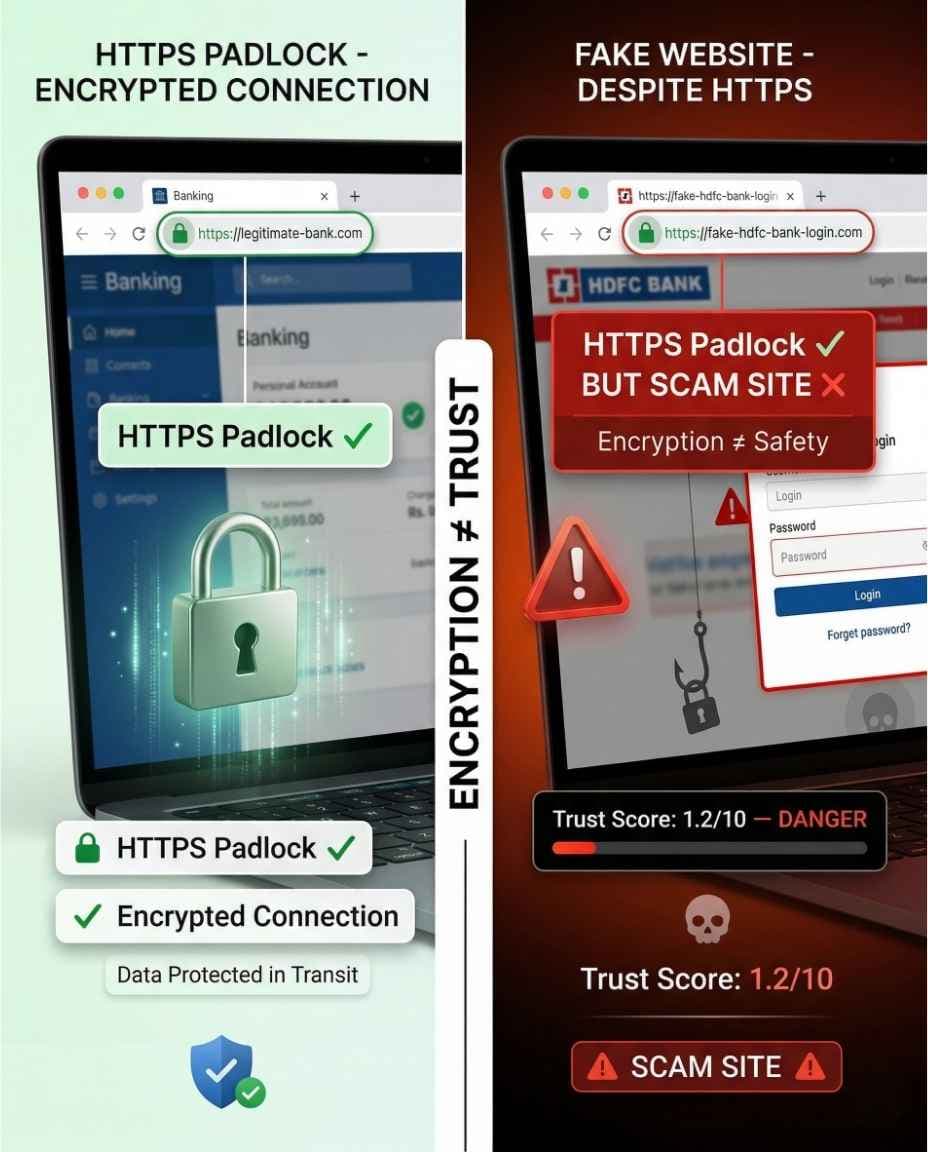
A padlock means encryption, not that the website is genuine
Helpline to call immediately if money moved
The One Rule That Stops Fake UPI Link Fraud
Legitimate UPI payments happen inside your app, not on random browser pages.
- Correct: open PhonePe, Google Pay, Paytm, BHIM, or your bank app yourself.
- Correct: approve or reject requests inside the installed app after checking the receiver.
- Wrong: entering UPI PIN on a website opened from a message link.
- Wrong: trusting a green padlock without checking the domain.
How Fake UPI Payment Links Work
Stage 1 - The link arrives in a trusted-looking message
The message comes through WhatsApp, SMS, Telegram, email, or a social media DM. It claims cashback, refund, prize, subsidy, failed bill payment, or investment withdrawal.
Stage 2 - A fake UPI or bank page opens
The page copies PhonePe, Google Pay, Paytm, BHIM, or bank branding and uses a similar-looking domain so the page feels legitimate at first glance.
Stage 3 - Credentials are harvested
The fake page asks for UPI ID, mobile number, UPI PIN, OTP, debit card details, net-banking password, or app login details.
Stage 4 - Funds are moved fast
The scammer uses the stolen information on real payment systems and moves money through mule accounts before the victim realises the page was fake.
Real Fake UPI Link Scam Patterns
| Delivery / Pretext | What Happens |
|---|---|
| WhatsApp - Fake PhonePe Cashback | A cashback claim link opened a cloned PhonePe page and asked for UPI PIN as verification. Money was debited within minutes. |
| SMS - Fake Bank Refund | A spoofed bank sender ID sent a refund link. The victim entered net-banking credentials on a fake page. |
| WhatsApp Group - Fake BHIM Scheme | A government-scheme message circulated in a group and led residents to a fake BHIM or NPCI-looking registration page. |
| Telegram - Investment Withdrawal | A job or investment group sent a withdrawal link that asked for UPI PIN before releasing fake profits. |
| SMS - Fake Electricity Bill | A failed-bill-payment link opened a fake bill desk page and asked for UPI credentials. |
| Shortened URL | A bit.ly or tinyurl link hid the real destination and redirected to a fake UPI payment page. |
8 Warning Signs Before Clicking Any UPI Link
- 1The domain is misspelled, has extra words, or uses a strange suffix.
- 2The link is shortened with bit.ly, tinyurl, t.co, or another URL shortener.
- 3The page asks for UPI PIN, OTP, debit card PIN, net-banking password, or full card details.
- 4The link arrived unsolicited through WhatsApp, SMS, Telegram, email, or DM.
- 5The URL contains a famous brand name but the real core domain is different.
- 6The page asks for more details than a normal UPI app would need.
- 7The page uses HTTPS or a green padlock and tries to make that feel like proof of safety.
- 8The message creates urgency: claim now, account blocked, refund pending, bill due, or prize expiring.
5 Rules to Protect Yourself
Never enter UPI PIN on any browser page
UPI PIN belongs inside your installed UPI app on the official UPI PIN screen. A website asking for it is a credential harvesting page.
Check the core domain before clicking
Read the text between https:// and the next slash. In phonepe.payment-india.com, the core domain is payment-india.com, not phonepe.com.
Treat shortened UPI links as unsafe until checked
Shorteners hide the destination. Paste the full link into RakshaAI Website Safety Checker before opening it.
Check suspicious linkVerify collect request UPI IDs before approving
Some links open your real UPI app with a collect request pre-filled. Check the UPI ID before approving any request.
Check UPI IDCheck the sender number before engaging
If the link came from WhatsApp, Telegram, or SMS, search the sender number before replying or clicking.
Check sender numberWhat to Do If You Already Entered Details
Treat this as urgent. A stolen UPI PIN or bank credential can be used quickly, so the first few minutes matter.
Change your UPI PIN immediately
Open the real PhonePe, Google Pay, Paytm, BHIM, or bank app yourself and change the UPI PIN. Do not use any link sent in the message.
Call 1930 if money moved
Give the transaction amount, time, UPI ID, bank, phone number, and the fake link. Fast reporting gives the best chance of freezing recipient accounts.
File on cybercrime.gov.in
Attach the full URL, screenshots of the fake page, WhatsApp or SMS message, sender number, and transaction evidence.
Contact your bank fraud team
Ask for UPI block, net-banking block if credentials were entered, fraud dispute, and beneficiary freeze request.
Report the fake domain
Report the URL to CERT-In, Google Safe Browsing, and RakshaAI so the fake page can be blocked and future victims are warned.
Fake UPI link recovery timeline
Immediately - Change UPI PIN in your real app.
Within 5 min - Call 1930 if money moved.
Within 1 hour - cybercrime.gov.in, bank fraud team, domain report.
Within 7 days - FIR at cybercrime police station with full evidence.
Report this fake UPI link and protect other Indians
How Fake UPI Links Are Delivered
| Platform | How It Arrives | Protective Action |
|---|---|---|
| Unknown number DM, group forward, or compromised contact sends cashback/refund link. | Do not open. Copy and check the link first. | |
| SMS | Spoofed bank sender ID claims payment, KYC, bill, or refund is pending. | Banks do not ask for UPI PIN through SMS links. |
| Telegram | Investment or job group posts a withdrawal or registration link. | Treat all Telegram UPI withdrawal links as unsafe. |
| HTML email mimics PhonePe, NPCI, bank, or payment gateway branding. | Check sender domain and open official app/site manually. | |
| Instagram / Facebook DMs | Fake customer support or cashback offer sends a payment page. | UPI apps do not send PIN collection pages in DMs. |
Related UPI Fraud Types
OTP & UPI PIN Fraud
Fake links often collect credentials first, then scammers follow up with OTP or PIN calls.
QR Code UPI Fraud
Both exploit UPI flow confusion. Scanning a QR sends money out; entering PIN on a fake page exposes credentials.
Fake UPI Payment Screenshot
Screenshot scams fake payment proof. Link scams steal credentials through fake pages.
Phishing Scams
The broader category of fake websites, emails, and cloned pages built to steal credentials.
Investment & Job UPI Fraud
Fake investment and task portals often use payment links to collect deposits or credentials.
Free Tools to Check Suspicious UPI Links
Frequently Asked Questions About Fake UPI Payment Links
What is a fake UPI payment link?
A fake UPI payment link is a fraudulent URL that copies PhonePe, Google Pay, Paytm, BHIM, bank, or payment-gateway branding and asks for credentials such as UPI PIN, OTP, net-banking password, or card details.
How do I check if a UPI payment link is safe?
Do not click first. Long-press or hover to see the full URL, identify the core domain, avoid shortened links, and paste uncertain links into a website safety checker before opening them.
Does HTTPS or the green padlock mean the UPI link is safe?
No. HTTPS only means the connection is encrypted. It does not prove that the website is genuine. A fake website can also use HTTPS.
Can I enter UPI PIN on a website?
No. Your UPI PIN should be entered only inside your installed UPI app on the UPI PIN screen. Any browser webpage asking for UPI PIN is unsafe.
What should I do if I clicked a fake UPI link and entered my PIN?
Change your UPI PIN immediately, call 1930 if money moved, file at cybercrime.gov.in, contact your bank fraud team, preserve screenshots, and report the fake domain.
What is a shortened URL UPI scam?
A shortened URL UPI scam uses links such as bit.ly or tinyurl to hide the real destination. Always expand or check shortened payment links before opening.
Can fake UPI links install malware?
Some suspicious links may try to download malicious apps or APK files. Do not install apps from payment links, keep your phone updated, and use official app stores only.
How do I report a fake UPI link in India?
Report to cybercrime.gov.in, call 1930 if money was lost, contact your bank, report the domain to CERT-In or Google Safe Browsing, and report the sender number or URL on RakshaAI.